
What’s new at Clear Street
We ship weekly. Explore the latest platform updates, feature releases and upcoming developments in one place.
Latest updates
Oct 30, 2026
Portfolio Transfers (ACAT)
Bring your existing brokerage account to Clear Street from the app on web and mobile, with no transfer-in fee. Choose a full transfer to move all your equities, options, and cash, or a partial transfer to pick the positions and cash you want to move. Upload a recent statement, sign electronically, and follow your request from the Transfers list.
Learn how to transfer your account
Changelog
- Omni handles trailing stops. Ask for a trailing stop or trailing stop limit, with the offset in dollars or percent, and Omni fills in the order card for you.
- More TradingView order settings. TradingView now supports IOC, FOK, at-the-open and at-the-close time in force, and extended hours on stop-limit orders. Rejections use the same plain-language messages as the app.
- Greeks on the options chain (web). Add, remove, rearrange, and reset the columns of the options chain to see what matters to you.
- Preview orders in the API. New order preview endpoints show the impact of an order without submitting it.
- See all your holdings at once (mobile). A new All tab on Positions lists every holding in one place.
- Know why Omni orders are rejected (mobile). If an order from Omni is rejected, its card shows the reason.
- Explore while you wait (web). Look around the app while your application is in review, with its status shown in the header.
- Overnight margin values. Overnight-session margin values now appear in the app.
Oct 23, 2026
Short Locates
Short locates and borrow rates are now built into Clear Street’s order flow on web (including omni), mobile, TradingView, API, and FIX . When you submit a short sale order on a stock that requires a locate, Clear Street requests it on your behalf and releases the order once it’s approved. You see an indicative borrow rate before you send the order. Learn more.
API Documentation
What you can do
- Short approximately 5,000 more stocks. Names requiring locates are now available on Clear Street, expanding your shortable universe from roughly 6,000 to roughly 11,000
- Short a stock that requires a locate from the order ticket, with the locate handled for you
- See an indicative borrow rate before you send the order
- Place short orders that need a locate in pre-market, regular and after-hours sessions
- Review existing locates through the API, and pull indicative borrow rates for up to 1000 symbols per call
How to short a stock that requires a locate
- Fill out an order ticket. The pre-trade check shows the order will open a short, with the indicative borrow rate.
- Send the order. Clear Street requests the locate. If the full quantity is secured, the order is released. If not, the order is rejected.
Good to know
- Locates are account-specific and expire at 8 PM ET, so they apply to day orders
- Short orders that need a locate are not supported overnight
- Borrow rates are indicative and can change. The rate charged is determined at billing
Short selling involves substantial risk, including potentially unlimited loss, and requires a margin account. Locates are not guaranteed and availability varies.
Changelog
- Earnings call transcripts are available. A new endpoint returns full transcripts by fiscal quarter, linked from each earnings event.
- Omni got smarter. Omni should now be more intelligent and significantly better at math.
- Contextual buttons. Chart Buy and Sell buttons appear only on tickers you can trade, on web.
- Overnight margin is now visible. Account balances endpoint now reports the equity required to hold positions overnight, including per-position contributors.
- Quality-of-life: watchlist improvements on web, and fill notifications consolidated so a burst of partial fills sends one alert instead of many. (Web / Mobile)
Oct 16, 2026
Trailing Stop Orders & FIX Sessions
Trailing Stop & Trailing Stop Limit Orders
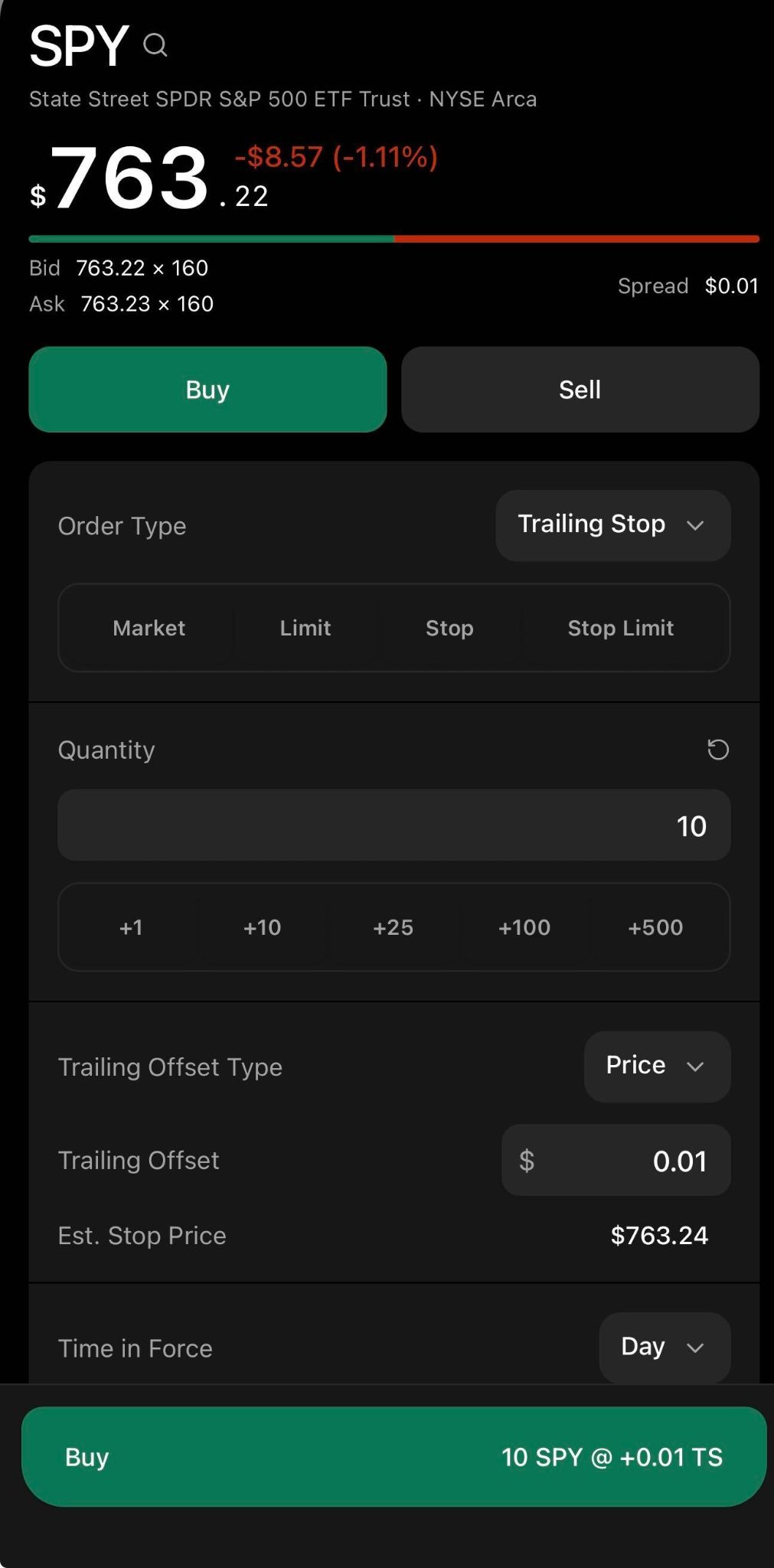
Trailing stop and trailing stop limit orders are now available on Clear Street’s mobile apps, web, API, and MCP, Automatically adjust stops as price moves to help manage risk and plan dynamic entries. Our API allows you to set the trailing offset by absolute dollar amounts and basis-points (bps). Learn more.
API Documentation
API Request:
{
  "order_type": "TRAILING_STOP",
  "symbol": "TSLA",
  "side": "BUY",
  "quantity": "1",
  "time_in_force": "DAY",
  "trailing_offset": "5",
  "trailing_offset_type": "PRICE",
  "id": "test-trailing-stop-20261016-001"
}
API Response:
{
  "account_id": *****,
  "client_order_id": "my-ref-id-20251003-002",
  "id": "0195f6d0-a1b2-7c3d-8e4f-5a6b7c8d9e01",
  "instrument_type": "COMMON_STOCK",
  "order_type": "TRAILING_STOP_LIMIT",
  "symbol": "TSLA",
  "side": "BUY",
  "quantity": "1",
  "filled_quantity": "0",
  "leaves_quantity": "1",
  "time_in_force": "DAY",
  "trailing_offset": "2.00",
  "trailing_offset_type": "PRICE",
  "status": "PENDING_NEW",
  "venue": "XNAS"
}Order Screen:
FIX Sessions
Clear Street customers can now trade using the Financial Information eXchange (FIX) protocol through a dedicated FIX API. FIX offers ultra-low latency and continuous connections, offering more speed and reliability than the REST API for high-frequency trading strategies. Learn More.
Changelog
- Omni is now better at fetching and understanding options chains
- Omni is now better at preparing DMA orders for your review and confirmation.
- Omni conversations go deeper: scroll up to load your full history, and download a transcript of any thread.
- Omni is now more helpful: it can provide links to help you find pages or sections of the product
Oct 2, 2026
VWAP and TWAP orders
VWAP and TWAP order types are now available on Clear Street’s mobile apps, web, API, MCP, FIX, and Omni. Big orders can move the price against you - VWAP and TWAP break them into smaller pieces and work them over a time window you choose, so you leave a lighter footprint and get a better average price. Learn more.
How to place a VWAP or TWAP order
Changelog
- Added TWAP / VWAP order types, now available on mobile apps, web, API, and Omni
- Economic calendar: CPI, FOMC, jobs reports, and other macro events, in the app, in Omni, and over MCP and the API
- Options-activity reports available in your documents.
- Snapshot a whole option chain by underlying and expiry in one API call.
- Earnings-call transcripts now feed Omni's research answers.
Coming soon
Multi-leg options
Spreads, condors, and butterflies in one ticket, up to four legs.
Take profit / stop loss
Attach exits to any order the moment you place it.
Price alerts
Set a level, get a push. In the app or by asking Omni.
Paper trading
Test strategies with live data and zero risk.
Prediction markets
Trade event contracts on real-world outcomes.
Retirement Accounts
Tax-advantaged retirement accounts on the same platform.
SMA enhanced margin
Buying power that keeps credit for your gains.
WebSocket API
Stream quotes, orders, and positions in real time.
Crypto
Trade crypto alongside your equities and options.
International equities
Markets beyond the US, in the same account.
Portfolio margin
Risk-based margin for sophisticated portfolios.
Futures
Trade futures alongside everything else you hold.