
Omni
Oct 21, 2026
Clear Street
Managing Your Watchlist with Omni AI

Learn how to manage your watchlist with Omni AI and find setups from your watchlist that give you the best trading edge.
Introduction
Your trading watchlist is key to monitoring what’s happening in the market and keeping setups on your radar. But actually managing your watchlist—adding and removing tickers, filtering for ideas, and tracking upcoming catalysts—takes critical time away from trading in fast-moving markets.
That’s where Clear Street’s Omni AI trading copilot comes in. Omni AI streamlines watchlist management, letting you build, modify, screen, and query your watchlist for actionable trade setups with simple conversational prompts.
In this guide, we’ll explain how you can manage your watchlist seamlessly with Omni AI and share some exciting ways to use Omni AI to spot opportunities.
How to Build a Watchlist with Omni AI
Building a watchlist with Omni AI is simple. Just give Omni AI a list of tickers you want to add, and it will put them on your watchlist immediately. If you want to remove tickers, Omni AI can do that, too—all you have to do is ask.
What’s great about Omni AI is that you don’t have to manually type out a list of tickers to build a watchlist. You can instantly add multiple tickers from screener results or simply give Omni AI a set of criteria for which tickers to add. For example, you can ask Omni AI to add any tickers that are reporting earnings after market close or any tickers that are up more than 10% in pre-market.
Since Omni AI has access to key technical data, you can also add tickers to your watchlist based on technical signals.
For example:
Add to my watchlist any tickers in the consumer discretionary sector that have experienced a bullish crossover of the 20-day moving average above the 50-day moving average in the last 3 days.

Omni AI is just as adept at removing tickers from your watchlist. For example, you can ask it to remove all tickers on your watchlist that are down more than 2% on the day or that have experienced a bearish moving average crossover since you added them.
Building a Daily Focus List with Omni AI
Within your larger watchlist, there may be a handful of tickers that you want to watch closely for trading opportunities on any given day. With Omni AI, you can easily create a daily focus list that includes just these tickers. Just tell Omni AI you want to build a focus list for the current session and list the tickers you want to include.
Alternatively, you can ask Omni AI to build a focus list for you based on what it knows about your strategy. It’s like getting an instant, personalized daily briefing for the stocks you follow. No more combing through your watchlist for candidates or trying to figure out what catalysts are most important.
For example:
Build a focus list for today based on which stocks on my watchlist deserve my attention.

You can also update your focus list at any time during the session with specific criteria. For example, following a mid-morning spike in volatility, you can ask Omni to remove stocks that dropped more than 5% so you can focus on names that showed relative strength.
Finding Trading Opportunities in Your Watchlist with Omni AI
Omni AI does much more than just build a watchlist. It also enables you to analyze the stocks on your watchlist, screen them for setups, and spot opportunities for trading.
Here are several ways you can use Omni AI to interact with your watchlist.
Monitoring How Watchlist Tickers Perform
Omni AI automatically tracks the price you added each ticker at. So, you can ask it to compare the add price to the current price to see how tickers have performed since they joined your watchlist.
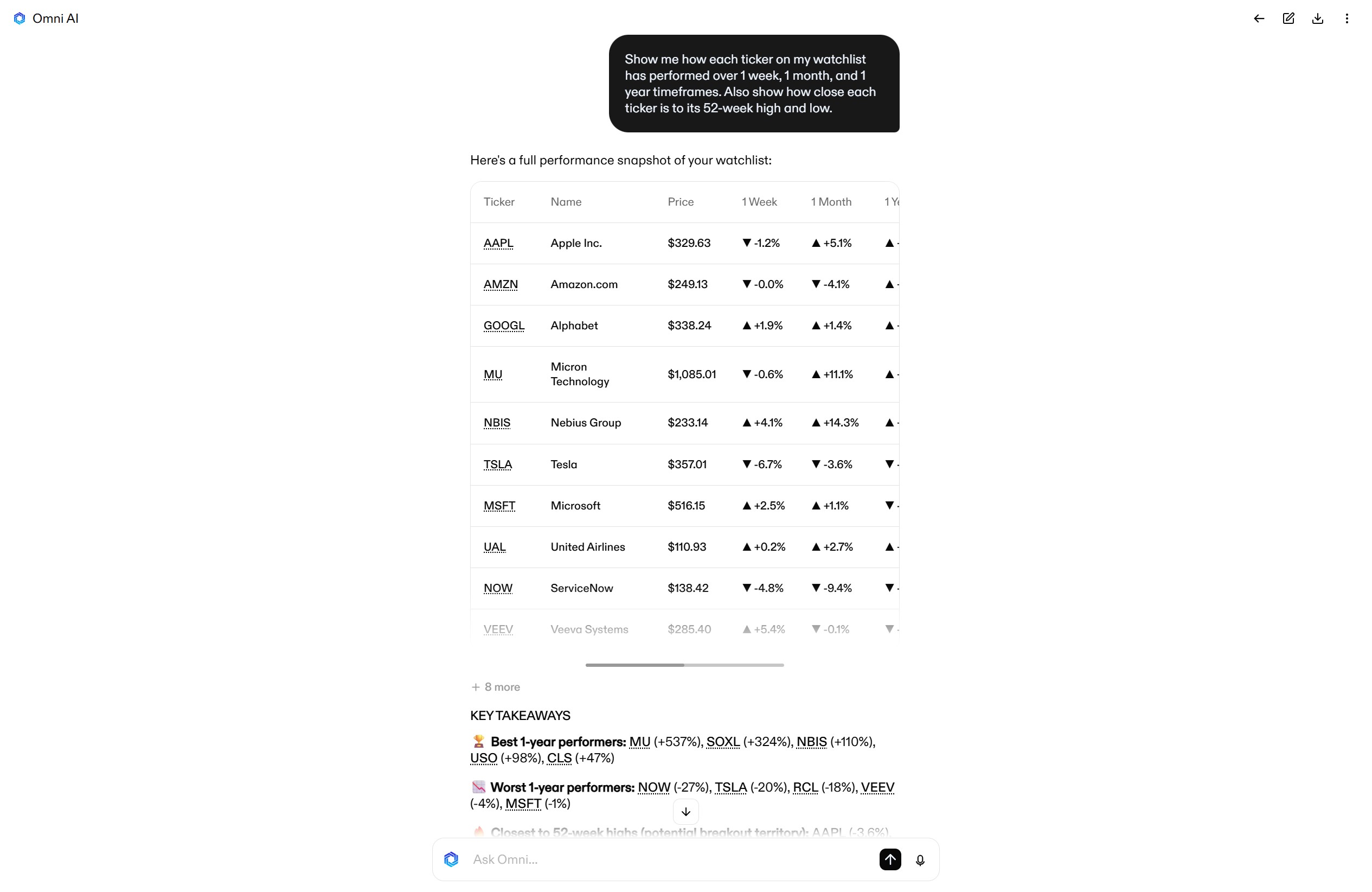
Going a step further, you can analyze ticker performance across your entire watchlist with a single prompt. For example:
Show me how each ticker on my watchlist has performed over 1 week, 1 month, and 1 year timeframes. Also show how close each ticker is to its 52-week high and low.
Identifying Catalysts That Impact Watchlist Tickers
Omni AI can also help you spot catalysts that might impact your watchlist tickers, such as earnings announcements, macroeconomic releases, industry events, and more.
There are several ways you can approach this:
- Ask Omni AI for a calendar of upcoming earnings for stocks on your watchlist.
- Ask Omni AI whether there are any upcoming market events that could impact multiple tickers on your watchlist simultaneously (such as mega-cap earnings announcements or economic releases).
- Ask Omni AI about a specific catalyst, and which tickers on your watchlist are likely to be impacted by it.
Here’s an example prompt you can use:
What upcoming catalysts could impact stocks on my watchlist? Are there any catalysts that are likely to impact multiple tickers simultaneously?

Screening Your Watchlist for Setups
Another highly actionable way to use Omni AI is to ask it to screen your watchlists for trading setups.
For example, you can ask Omni AI to identify stocks that are poised for a breakout above resistance on the daily timeframe, and it will automatically analyze each of your watchlist tickers to find candidates. You can also give Omni AI your specific setup conditions and ask it to find stocks that either meet those conditions or are getting close.
Here’s an example prompt:
Search my watchlist for stocks that are up more than 2% intraday and have a high probability of bullish continuation based on 1-hour momentum indicators.

Scenario Planning around Watchlist Tickers
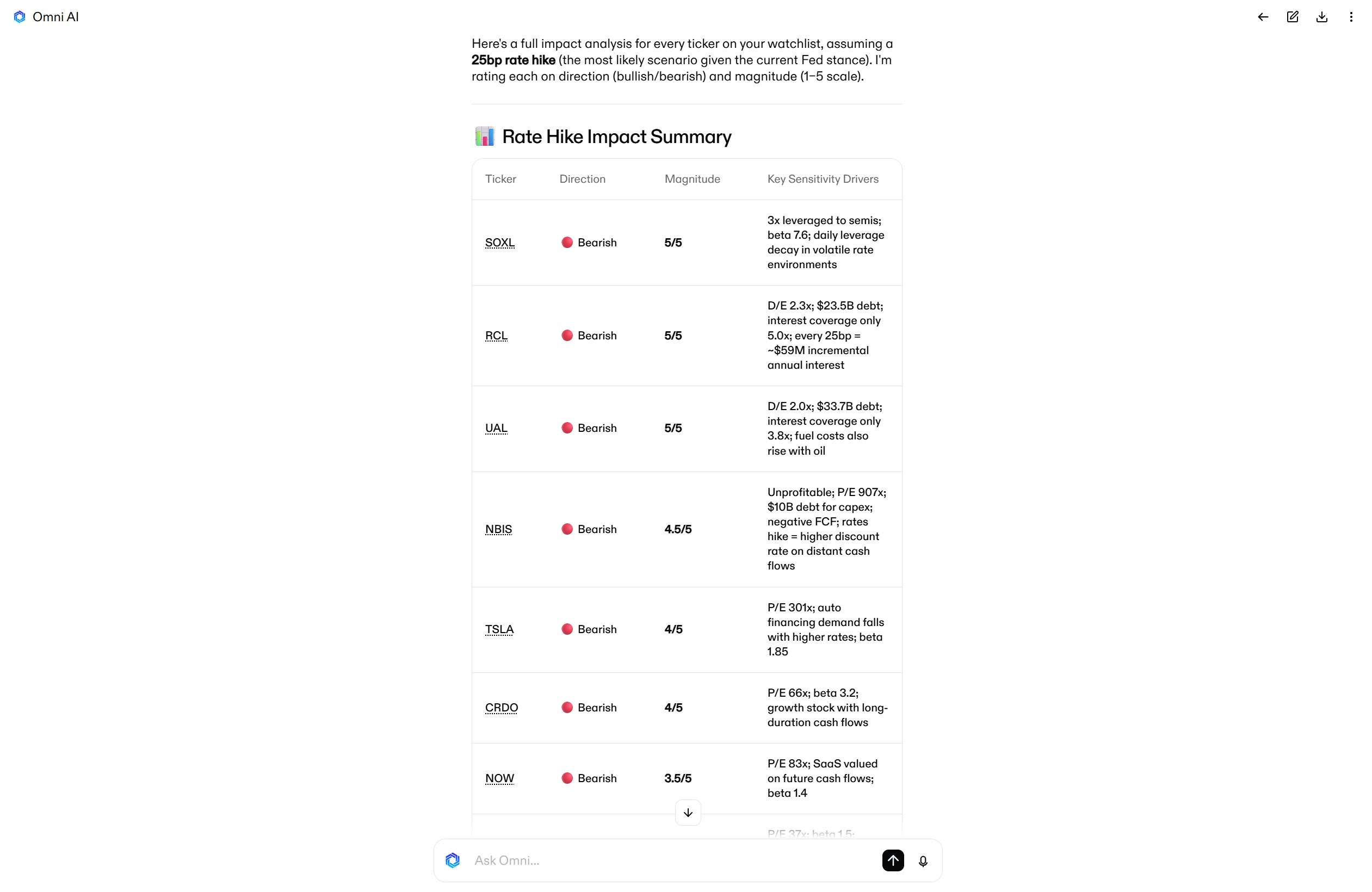
Omni AI can also help you model how market events or trends will impact the tickers on your watchlist. For example, you can simulate shocks like a sudden market drop, sector rotation, or interest rate change and ask Omni AI how each of your watchlist stocks might respond.
For example, you can ask Omni AI:
How would the stocks on my watchlist react to an interest rate hike? Rate whether it would be bullish or bearish and the magnitude of the impact.
Analyzing Correlation Risk with Existing Positions
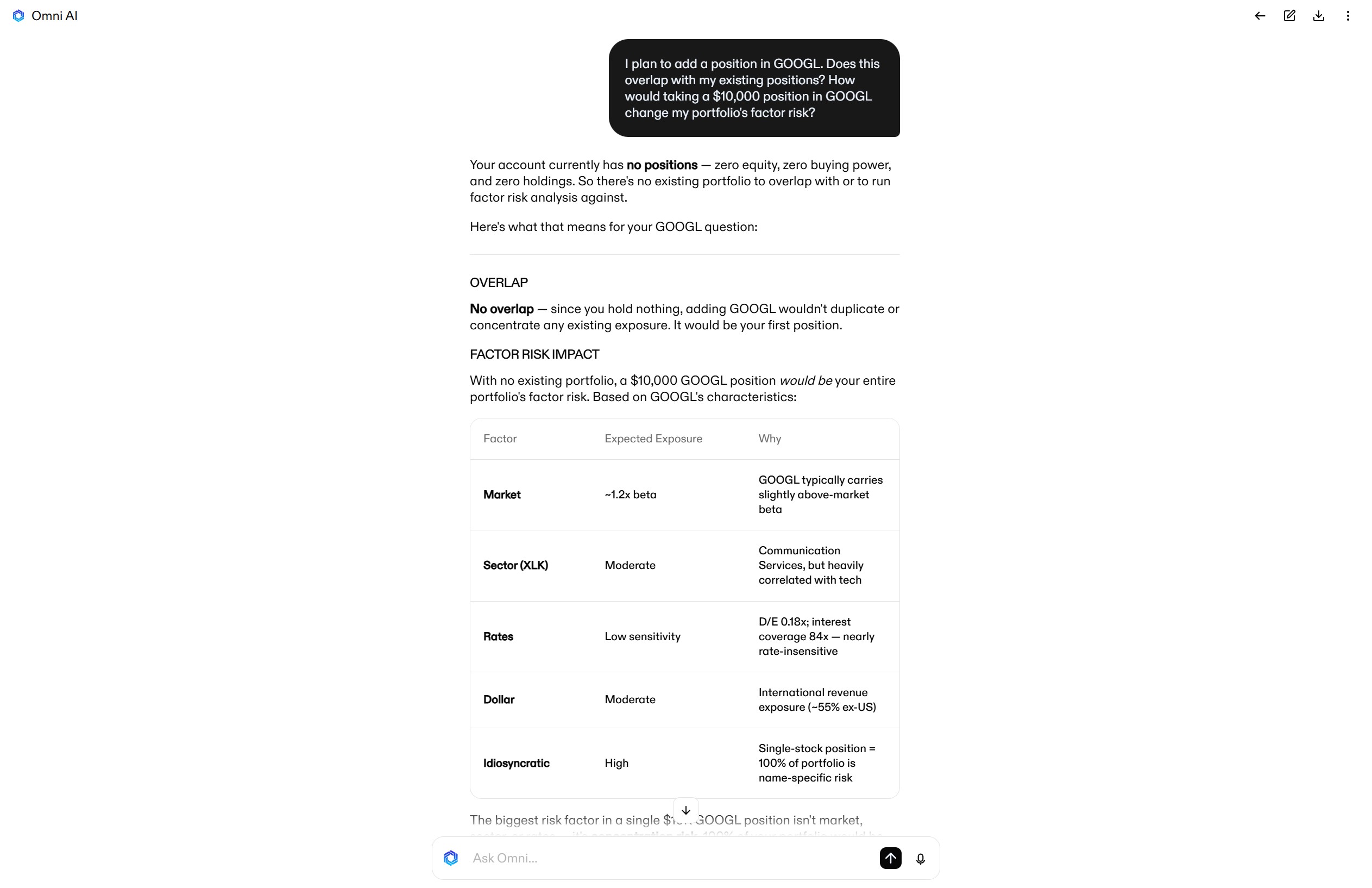
You can also analyze your watchlist in the context of your existing portfolio. Omni AI can highlight how tickers on your watchlist overlap or correlate with your open positions. It can also quantify how a new addition would shift your factor risk and sector concentration. It’s a powerful “what if” analysis that lets you fully map out the risk of new positions.
Here’s an example prompt:
I plan to add a position in GOOGL. Does this overlap with my existing positions? How would taking a $10,000 position in GOOGL change my portfolio's factor risk?
Take Your Watchlist to the Next Level with Omni AI
Your watchlist shouldn’t just be a static list of stocks and prices. With Omni AI, it becomes a searchable database of actionable ideas that you can tailor to the current market environment.
Ready to experience next-generation watchlist management for yourself? Open a Clear Street account today to try Omni AI.
Products and services offered by Clear Street LLC, member FINRA, SIPC, CFTC and NFA. Additional information about Clear Street is available on FINRA BrokerCheck, including its Customer Relationship Summary.
Clear Street does not provide investment, legal, regulatory, tax, or compliance advice. Consult professionals in these fields to address your specific circumstances. These materials are provided for informational purposes only and subject to change without notice or obligation to replace any information contained therein. This is not an offer, solicitation of an offer, or advice to buy or sell securities, or open a brokerage account in any jurisdiction where Clear Street is not registered. Securities trading, particularly trading on margin or using options, involves significant risk and is not suitable for all investors.
Related blogs
.avif)
.avif)

.svg)