
Omni
Oct 21, 2026
Clear Street
How to Use AI to Analyze Trade Opportunities

Discover how you can use AI to analyze trade opportunities. We explain 7 steps to review trading setups and apply a more consistent process to your analysis.
Your scans have turned up a clean trade setup, and you see a potential opportunity. But before you pull the trigger, you need to analyze whether this is really a higher-quality trade or just another trap.
That’s harder than it sounds when price moves fast and you’re fighting the urge to catch an entry before it slips away. It’s all too easy to overlook a catalyst, rationalize a red flag, or simply skip your pre-trade checks.
This is where AI can help, and why an AI co-pilot may support your pre-trade process. With AI, you can add a step between your idea and your order and review data on each setup before you decide.
In this guide, we’ll walk through 7 steps to use AI to analyze trade opportunities so you can review your setups more thoroughly before you risk capital.
Before You Start: Choosing the Right AI for Trading
Before you begin using AI to analyze trades, it’s important to recognize that not all LLMs are created equal. General-purpose LLMs can discuss trading broadly, but you may need to prompt them to consider confirmation and risk/reward. Some chatbots may agree with your ideas too readily, so it helps to ask any AI tool to challenge your thesis and evaluate risk.
In contrast, AI chatbots built for trading, like Clear Street’s Omni AI, are designed to consider risk when asked to analyze a trade. Choosing an AI tool built for trading can help you evaluate setups and get feedback on your ideas.
Also remember that most AI chatbots don’t have access to live market data by default. You’ll need to connect them to a trading Model Context Protocol (MCP) server that provides real-time price quotes, key technical metrics, and live options chains in order to get useful trade analysis. Omni AI is built into Clear Street’s brokerage platform and already has access to market data, so you can get started without additional setup.
With that in mind, let’s dive into the steps to analyze trades with AI.
Step 1: Share Your Trade Idea with AI
The first thing you need to do is share your trading strategy and your specific trade idea with your LLM so it can tailor its analysis specifically to you.
Be as detailed as possible about your trading rules, including the types of stocks you focus on and any specific technical criteria you require in order to trade (for example, if you only trade stocks above the 200-day moving average). It’s also helpful to give your AI context about your trading style, such as whether you’re a day trader or swing trader and whether you’re a momentum or reversal trader.
When explaining your trade idea, include a time horizon, details about your risk tolerance, and any supporting evidence for your thesis. You can even tell the AI how you found the setup to provide additional context about your trading criteria.
Here’s an example prompt:
I’m a momentum swing trader interested in trading a breakout on AAPL stock above the $335 resistance area. I’m watching building momentum on the 1-hour and 4-hour charts, including rising 9 and 20-period moving averages and a bullish MACD crossover. My goal for the trade is to achieve at least a 3:1 risk/return and I am targeting a time horizon of up to several days for the trade. I want you to help me analyze this trade to determine if this is a higher-quality setup and what I should consider before approaching the trade.
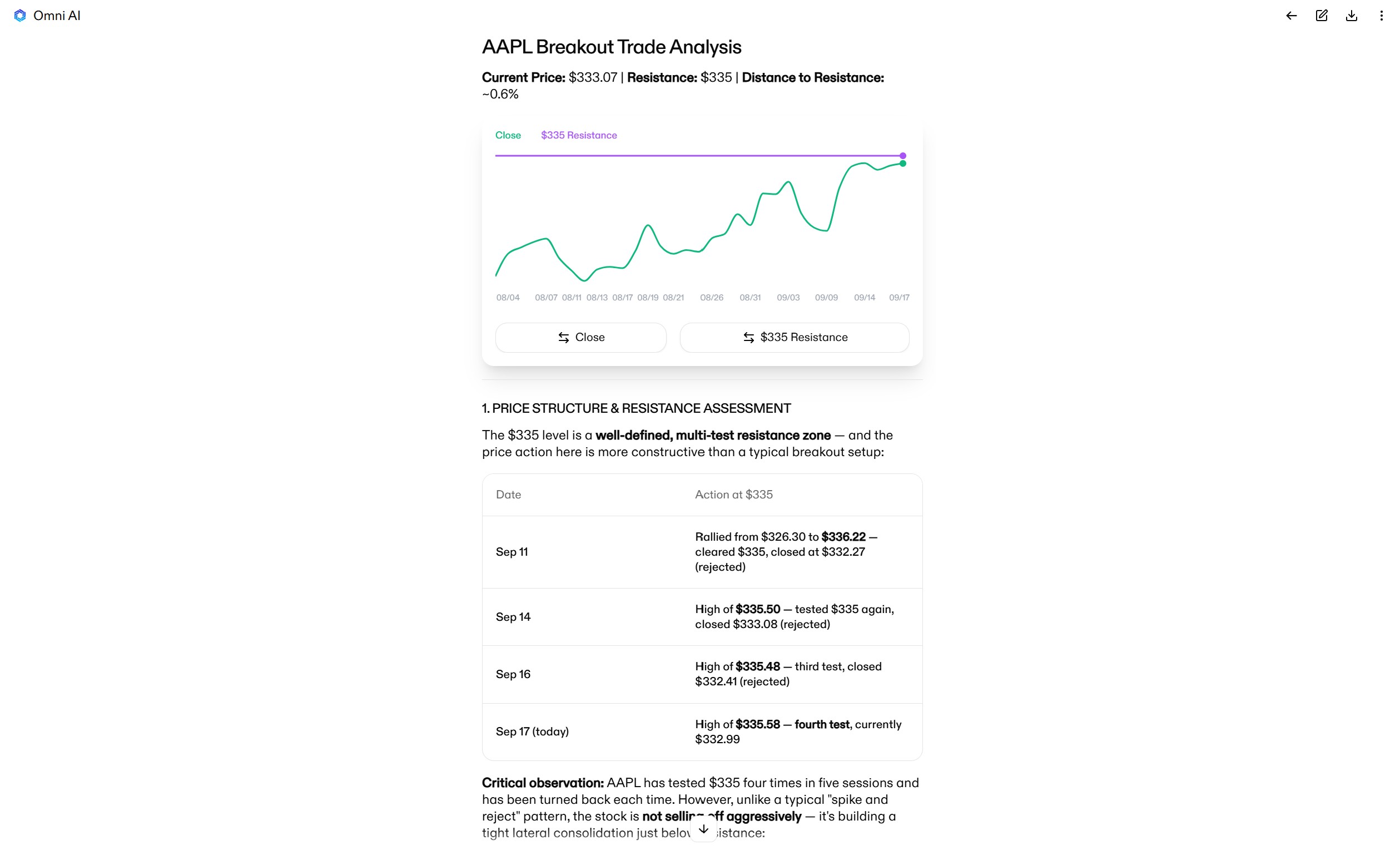
Step 2: Evaluate Key Technical Signals
Once the AI knows the details of your setup, you can dive into deeper analysis. A good place to start is to get an objective reading of the key technical indicators that support or counter your idea. This can focus on a combination of momentum indicators, volume patterns, support and resistance levels, and any other indicators that are relevant to your strategy.
Ask AI whether specific signals are bullish or bearish and whether they support your trade thesis. It’s also a good idea to ask whether AI identifies any other technical signals that raise potential red flags.
Here’s an example prompt:
Evaluate moving averages, RSI, MACD, VWAP, and volume profiles for AAPL on the 4-hour chart. For each indicator, is the signal bullish or bearish, and does it support a breakout on the time horizon of my trade? Are there any technical indicators that signal declining momentum? Where are the key support and resistance levels around $335?
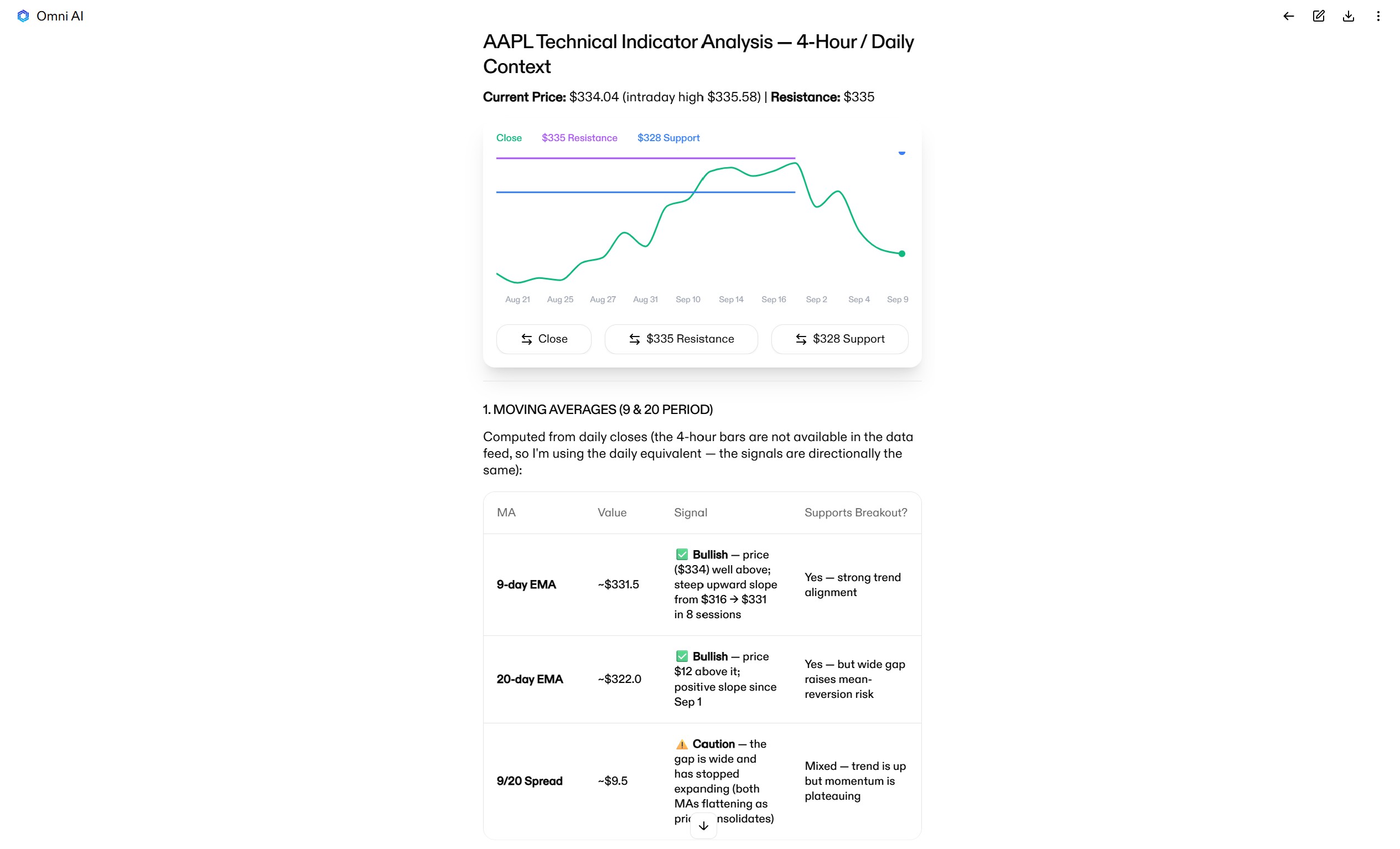
Step 3: Look for Confluence
Next, it’s important to look for confluence across timeframes and assets. The goal is to determine whether a setup is pointing in the same direction as higher-timeframe charts and whether moves in related assets suggest your setup is in line with the broader market rather than an outlier.
For multi-timeframe analysis, ask AI whether a trade’s direction and timing is supported on the daily chart (and for swing trades, on the weekly chart). Look for alignment among momentum indicators or support and resistance levels on higher timeframes that could impact price action.
Here’s an example prompt:
Analyze the daily and weekly charts for AAPL. Is momentum bullish or bearish? Are there any technical signals that support a breakout on these higher timeframes? Where are the key support and resistance levels on these charts around the $335 level?
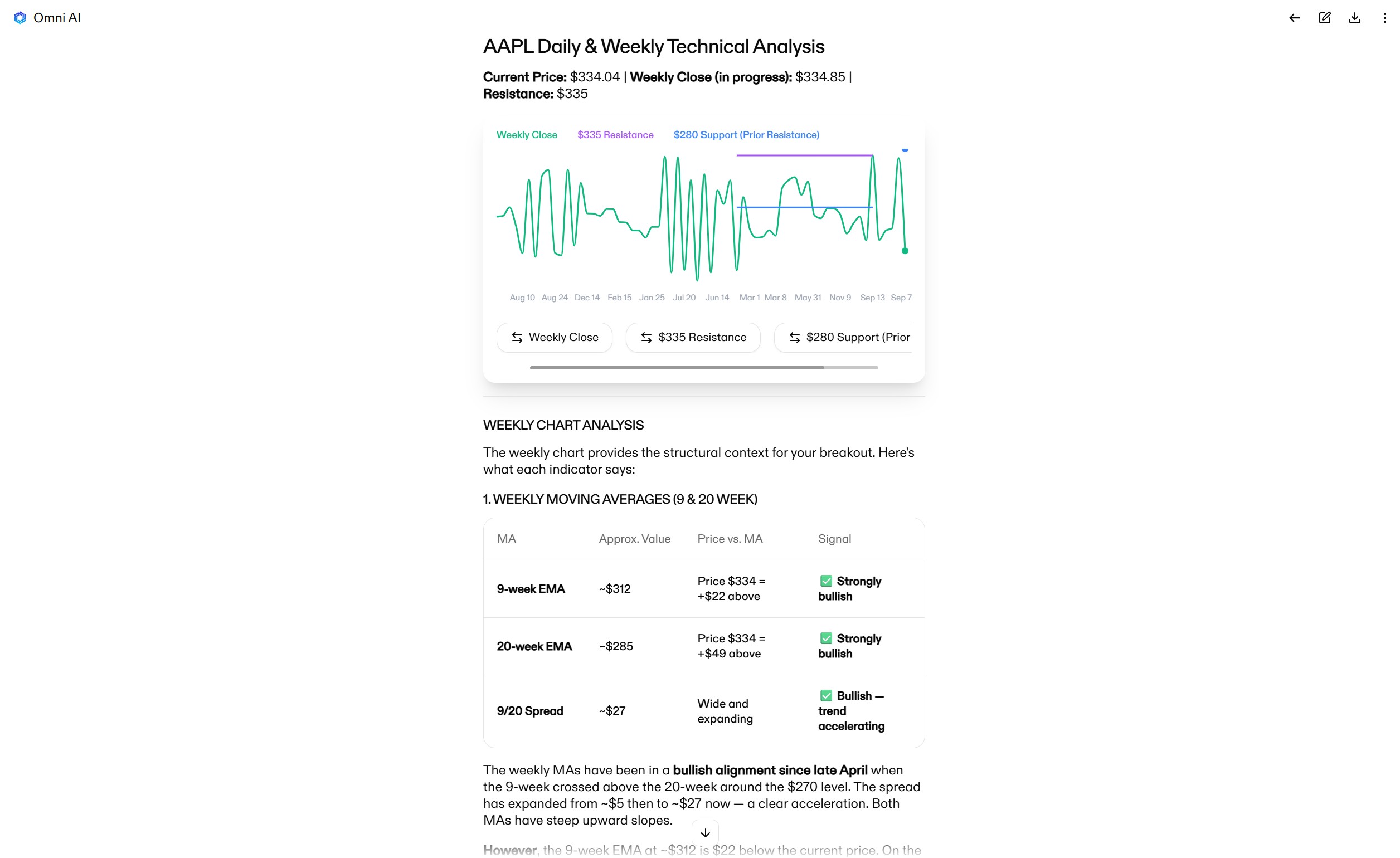
For multi-asset analysis, ask AI to analyze the broader market, including major stock indices and the sector your target stock is in. If relevant, you can also ask AI to analyze trends in other asset classes like the VIX or Treasury yields.
Here’s an example prompt:
Consider trends in the S&P 500, Nasdaq, and tech sector. Do these trends suggest strength or weakness in AAPL stock over the timeframe of my trade? How might the VIX and Treasury yields be affecting AAPL?

Step 4: Check for Catalysts
Another key check to perform before entering a trade is whether there are any major catalysts that could impact your idea. Ask AI to check for upcoming earnings reports, industry events, or major economic releases that could spike volatility in the middle of your trade. If you’re trading small-cap stocks, it’s also a good idea to ask AI to evaluate the order book for the ticker to identify potential liquidity concerns.
Here’s an example prompt:
Are there any earnings reports, industry events, macroeconomic releases, or other potential volatility events that could impact AAPL over the next several days?
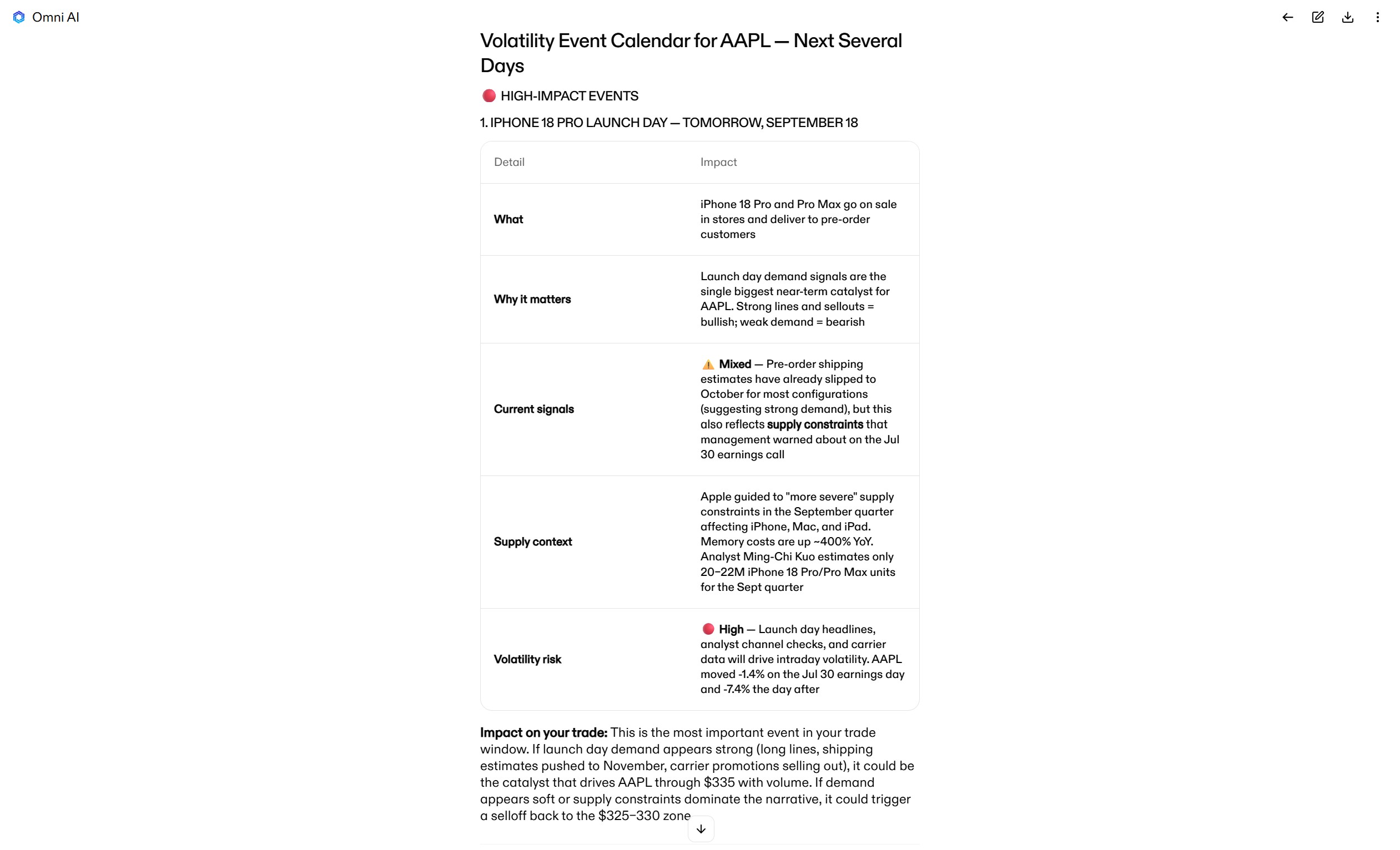
Step 5: Stress-test Your Thesis
Before you commit to a trade, it’s important to prepare for how it could potentially go wrong—and know what you’ll do about it. AI can help with this part of the analysis by challenging your thesis, giving context on how a ticker has behaved in the past, and walking through possible scenarios.
The first thing to do is ask AI to play devil’s advocate. Have it identify the price levels, technical signals, volume patterns, or broader market movements that would undermine the quality of your setup. You can use this information to match your stop loss to a price level that actually matters and monitor your trade for early warning signs that it could move against you.
Here’s an example prompt:
What price levels, technical signals, volume signals, or broader market movements would invalidate this trade setup? Is there a specific price level at which the $335 breakout idea dies?
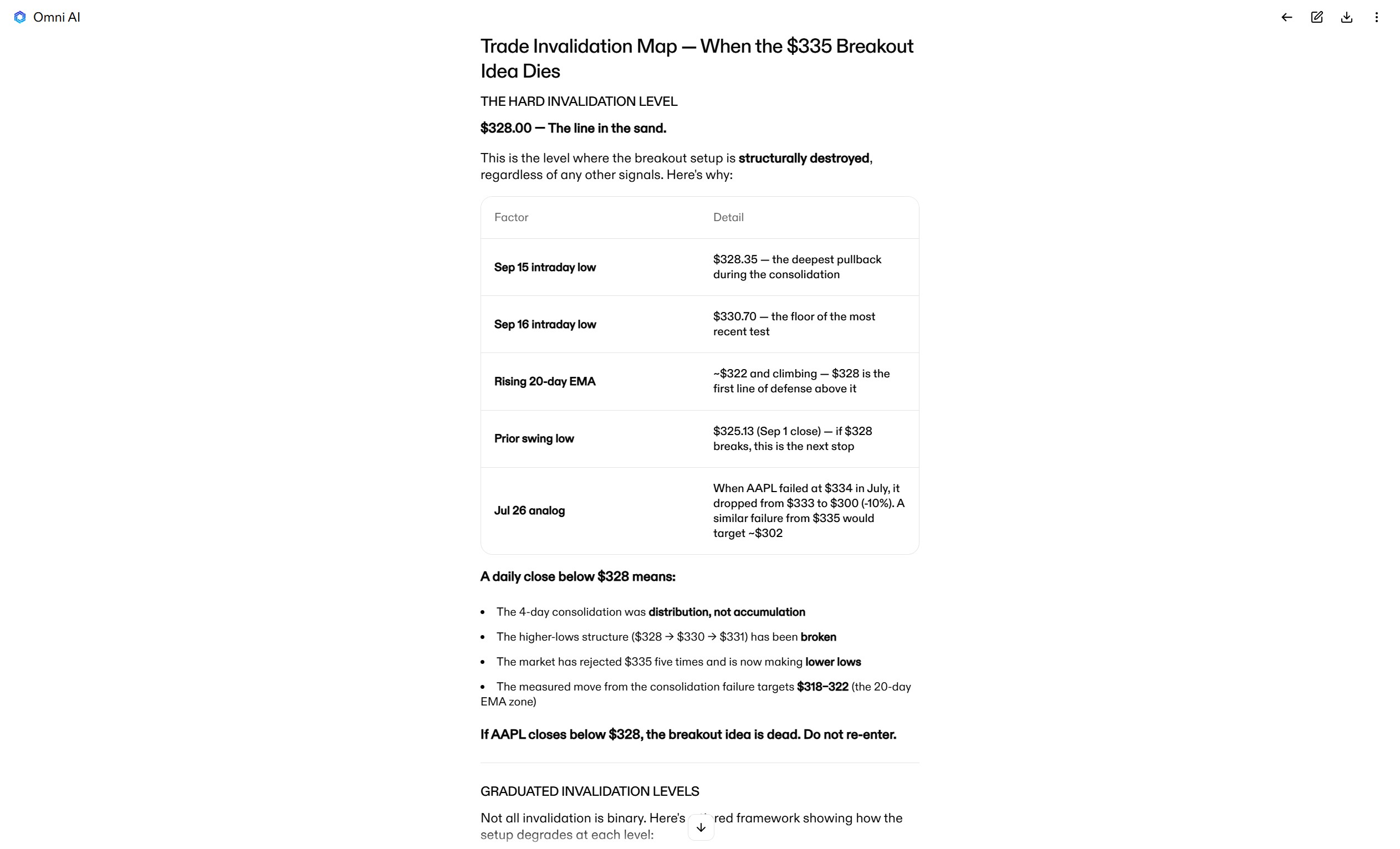
It’s also a good idea to compare your setup against alternatives. For example, multiple tickers in a sector may be moving together, and AI can help you review how your ticker compares with others in its sector. You can also ask AI to compare similar setups so you can review the risk/reward of each. Output is informational only and is not a recommendation.
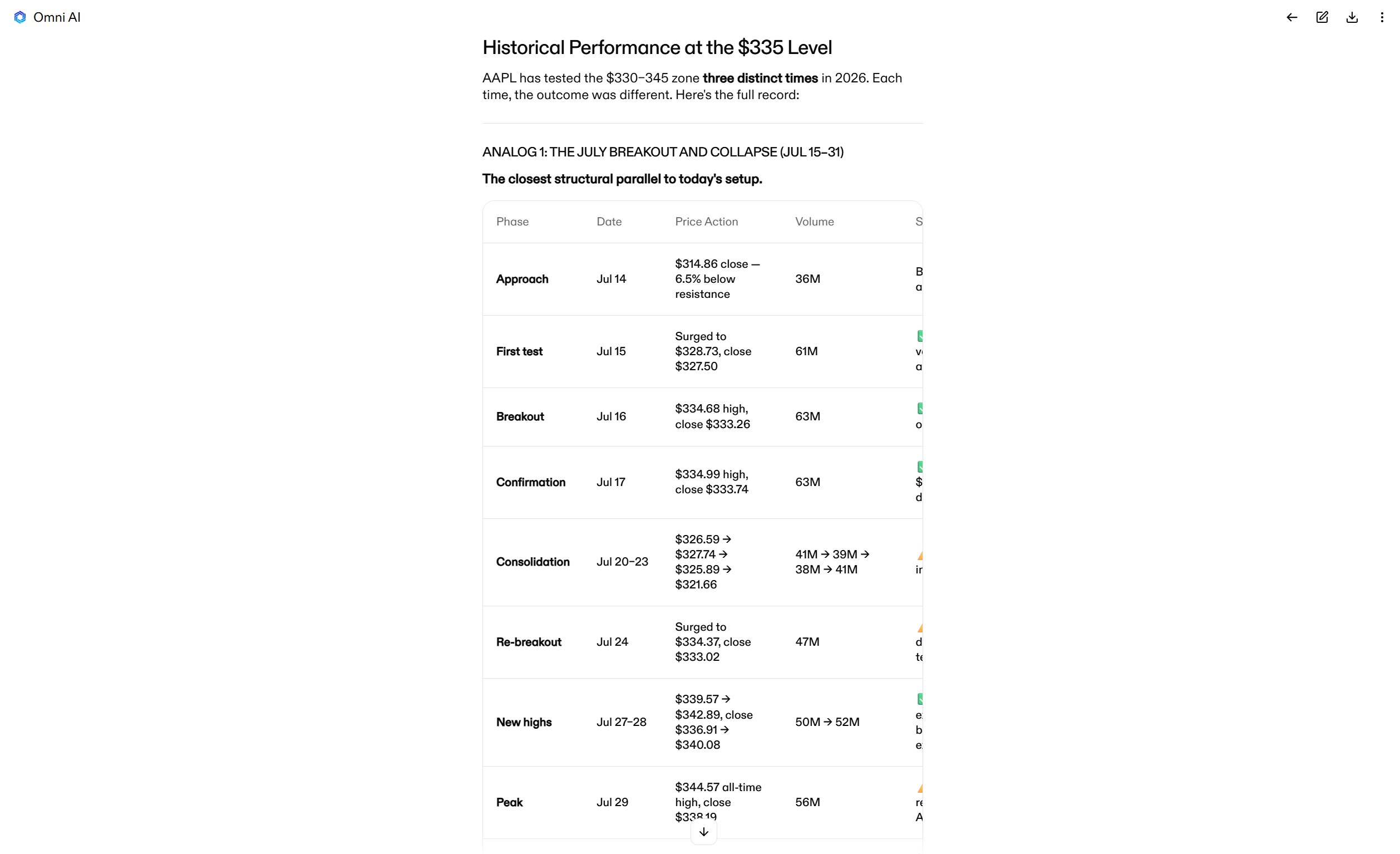
Another way to use AI is to look at how a stock has reacted in the past around similar levels. Past behavior does not predict future results. For example, you can ask it to analyze how a stock has performed in the recent past when a ticker has tested a specific price level or shown a specific combination of technical signals.
Here’s an example prompt:
How has AAPL performed in the past when testing the $335 level? Are there other analogs to this breakout setup in AAPL’s recent history? How did it react?
Step 6: Score your Setup
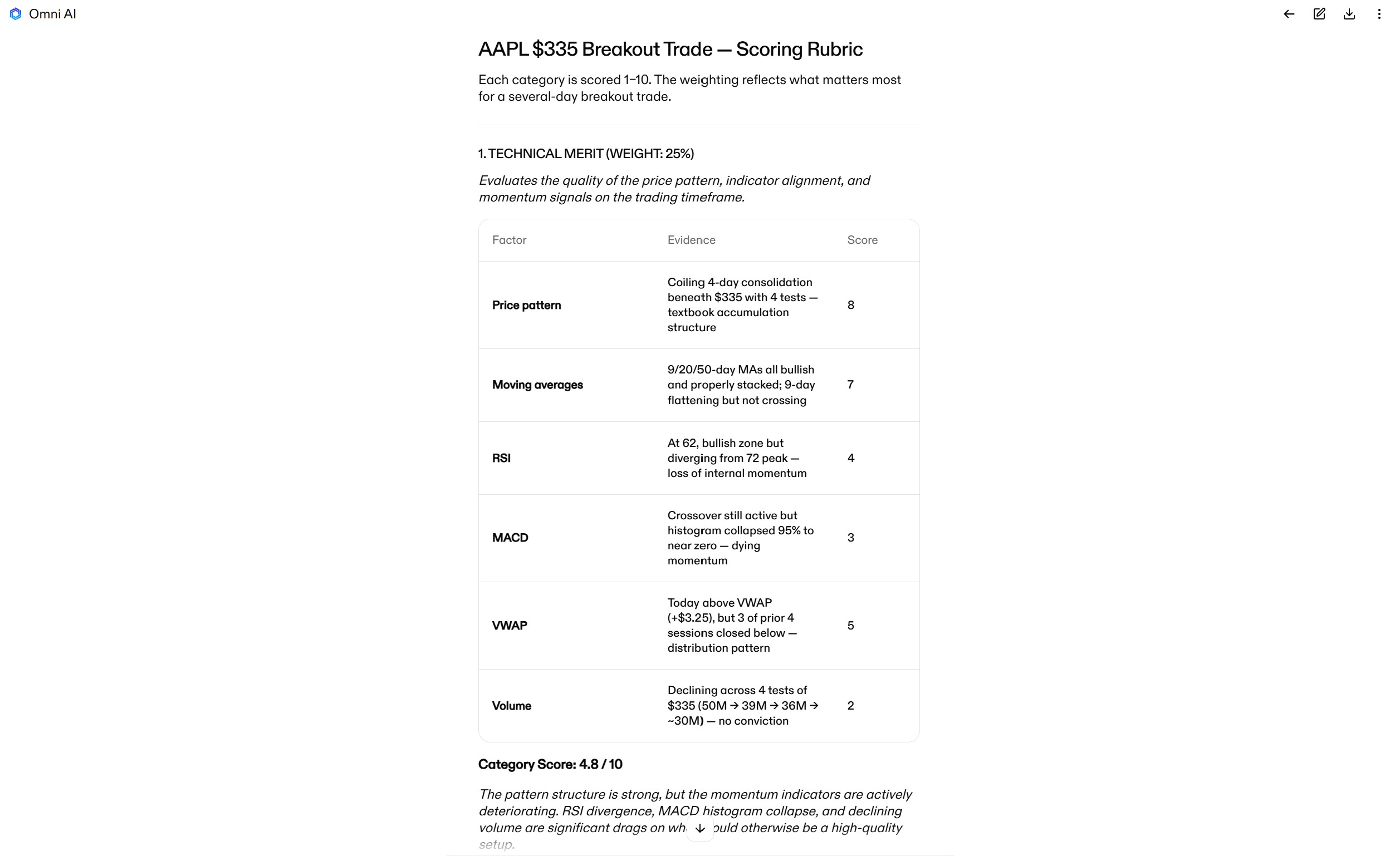
At this point, you should have a lot of data about your setup, including any red flags. A good way to organize all of this information and apply a consistent process is to ask AI to run it through a simple scoring framework or checklist. For example, your framework can assign a 0-10 rating to a setup’s technical support, entry quality, confluence across timeframes and assets, and risk/reward.
This is also an opportunity to identify common trading mistakes you make, such as entering before confirmation, and proactively prevent them. For example, you can ask AI to highlight specific entry conditions or green lights you should look for before entering the trade.
Here’s an example prompt:
Create a scoring rubric for this trade that evaluates it on technical merit, entry quality, multi-timeframe confluence, confluence with broader market trends, and overall risk/reward. Summarize the key supporting evidence for the trade and the most important red flags. Also summarize what confirmation to look for to initiate an entry.
Step 7: Plan your Position
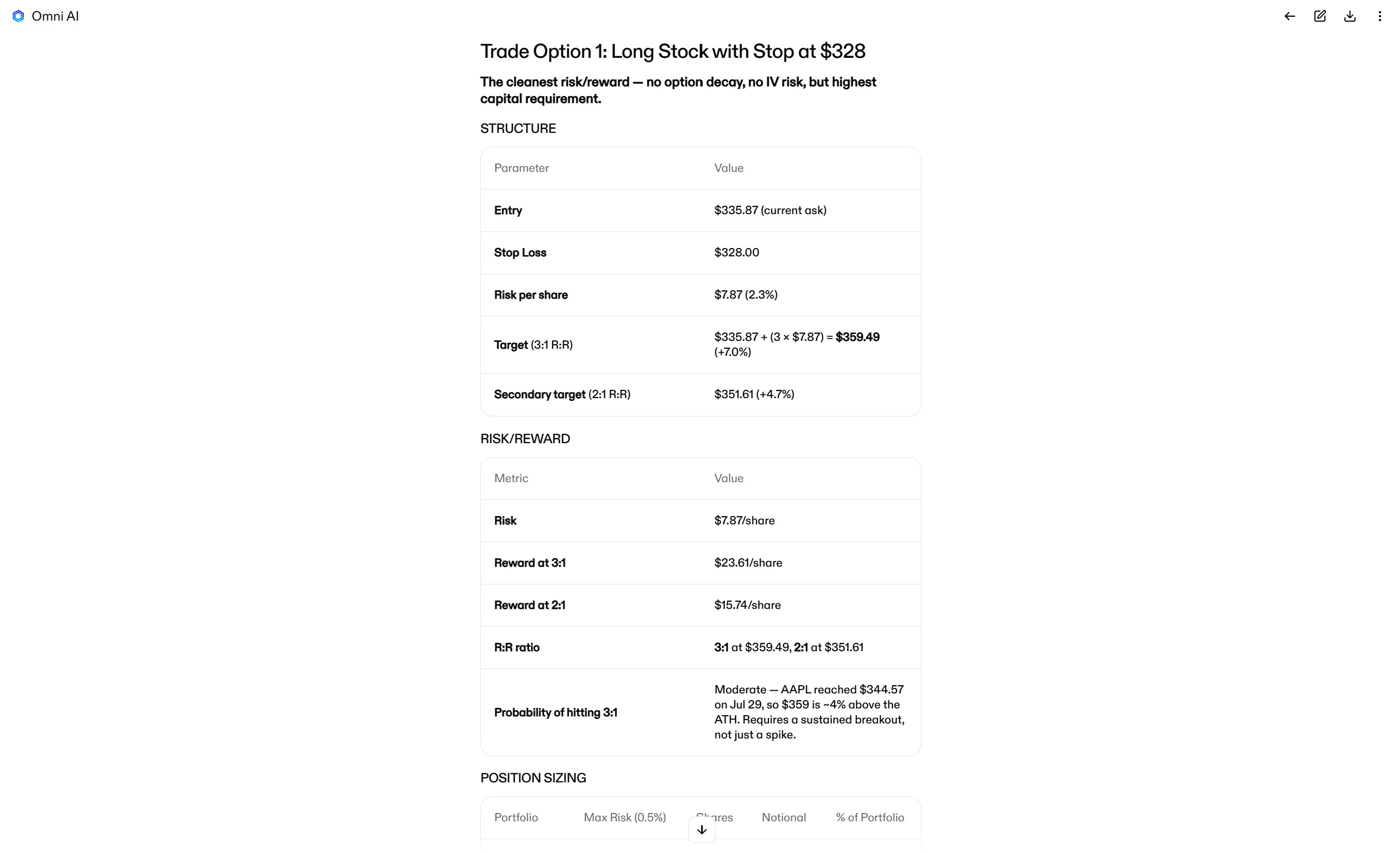
Finally, you can use AI to help you develop and size your position according to your risk tolerance and conviction in the trade. Ask it to explain different ways to structure the trade and calculate the risk/reward for each approach using your desired stop loss. Then ask AI to calculate your position size based on a percentage of your portfolio or the maximum amount you’re willing to risk.
Here’s an example prompt:
Explain how I could structure a trade around a breakout above [price level] in [TICKER]. Calculate the risk/reward for each approach using a stop loss at [price]. Show how position size changes if I risk a maximum of [x]% of my portfolio.
Analyze your trades with Omni AI
Analyzing your trades with AI can be a useful way to review your setups and apply a more consistent, rules-based process to your decisions. It can help you confirm or invalidate your thesis, spot red flags, review scenarios for how a setup could evolve, and think through risk considerations before each trade.
Omni AI is built for trading and has access to market data inside your Clear Street account. It supports many parts of the trading process, from analyzing the market and reviewing your ideas to preparing orders you review and confirm and analyzing your performance. It’s a tool for traders who want to review their setups more thoroughly before opening a position.
Ready to start analyzing trades with Omni AI? Sign up for a Clear Street brokerage account today to get access.
Important Disclosures
Securities offered through Clear Street LLC, member FINRA/SIPC.
Not an offer or solicitation where Clear Street is not registered.
All investments involve risk; past performance does not guarantee future results.
Options involve risk and are not suitable for all investors.
Margin borrowing increases risk; you can lose more than you deposit.
Information is for informational purposes only, is not an offer, and may change without notice.
System response and execution times are affected by market and system factors.
Omni AI (Clear Street Technologies LLC) is informational only, not advice; every order requires your confirmation.
Omni AI scenario analyses are hypothetical, may be inaccurate or incomplete, and are not predictions or guarantees of actual results.
Third-party AI tools that you choose to connect to your Clear Street account are not provided or endorsed by Clear Street, and their output is not investment advice from Clear Street. Every order requires your confirmation.
Products and services offered by Clear Street LLC, member FINRA, SIPC, CFTC and NFA. Additional information about Clear Street is available on FINRA BrokerCheck, including its Customer Relationship Summary.
Clear Street does not provide investment, legal, regulatory, tax, or compliance advice. Consult professionals in these fields to address your specific circumstances. These materials are provided for informational purposes only and subject to change without notice or obligation to replace any information contained therein. This is not an offer, solicitation of an offer, or advice to buy or sell securities, or open a brokerage account in any jurisdiction where Clear Street is not registered. Securities trading, particularly trading on margin or using options, involves significant risk and is not suitable for all investors.
Related blogs
.avif)
.avif)
.avif)
.svg)