
Trading
Sep 30, 2026
Clear Street
9 Ways to Use Omni AI to Become a Better Trader
.avif)
See how Omni AI can take your trading to the next level. We cover 9 ways you can use Omni to find actionable ideas, plan trades, manage risk, and more.
Introduction
Clear Street’s Omni AI is a comprehensive trading assistant built to unlock the full potential of AI for trading. It’s connected to real-time, institutional-grade data feeds so you can move seamlessly from researching tickers to analyzing setups to executing trades — all inside your brokerage platform.
For traders, that means a more streamlined workflow, better trade ideas, and faster execution on opportunities every single day.
Ready to turn that capability into your edge? We’ll break down 9 ways you can use Omni AI to trade and give you the exact prompts you need to get started.
What makes Omni AI different?
Omni AI isn’t just another AI chatbot like ChatGPT or Claude. While all-purpose LLMs struggle with trading, Omni AI is built specifically to help you navigate the market. It has access to real-time quotes and institutional-grade market data, allowing you to build trades with confidence using accurate, actionable information.
On top of that, Omni AI has access to your live Clear Street brokerage account. It can update watchlists, monitor your active positions, and even stage and execute trades. It’s an active trading copilot, not just a passive research assistant.
Here’s how you can use Omni AI to help with every stage of trading, from research and idea generation to planning and executing your trades. Once you start trading with Omni AI, you won’t know how you traded without it.
#1. Generate a market report
Omni AI excels at market research, and you can use it to start your day with a custom market report. The chatbot can highlight key events like upcoming earnings and macroeconomic releases, give you a read on market sentiment and recent price action, and highlight specific tickers that are moving in premarket.
Here’s an example prompt: Create a daily market report that highlights today's key earnings reports and macroeconomic events, market sentiment, recent price action, the biggest premarket gainers/losers, and top movers on my watchlist. Include major market news and anything else I need to know heading into the trading day.
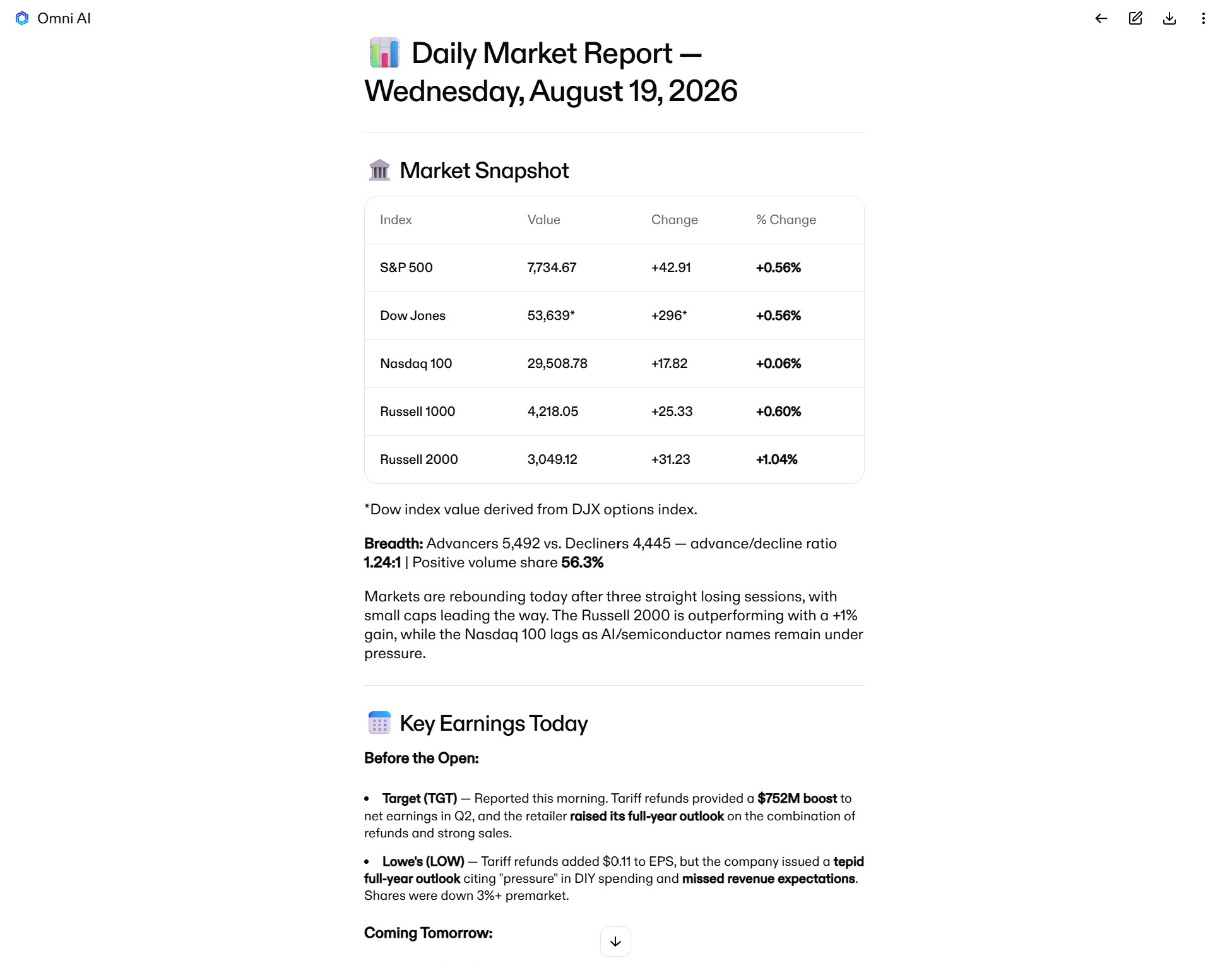
The report tells you what happened overnight, what’s coming up today, and gives you a read on how all of it could impact the market. You can also follow up with Omni AI to dig into specific catalysts in more detail or find out why a stock is moving.
Market reports aren’t limited to the start of the day, either. You can ask Omni AI to generate post-market reports to help you build a watchlist for the next day or weekly and monthly reports to help you position for swing trades. It’s a simple but powerful way to stay one step ahead of emerging setups.
#2. Monitor your watchlists
Omni AI has access to your watchlists, which is a big advantage over using general-purpose chatbots like ChatGPT. You can ask Omni AI to add or remove names from your watchlist at any time. It’ll automatically track how tickers have performed since you added them to a watchlist, not just how they’re performing today.
Even better, you can ask Omni AI to analyze stocks within your watchlist. It can tell you about top movers, recent news, or upcoming catalysts. An especially effective way to use it is to ask it to rank potential trade setups for tickers in your watchlist based on the technical indicators that matter for your strategy.
Here’s an example prompt: Analyze the stocks in my watchlist using moving averages, RSI, MACD, support and resistance levels, and volume. Which stocks offer the best potential for a breakout trade?
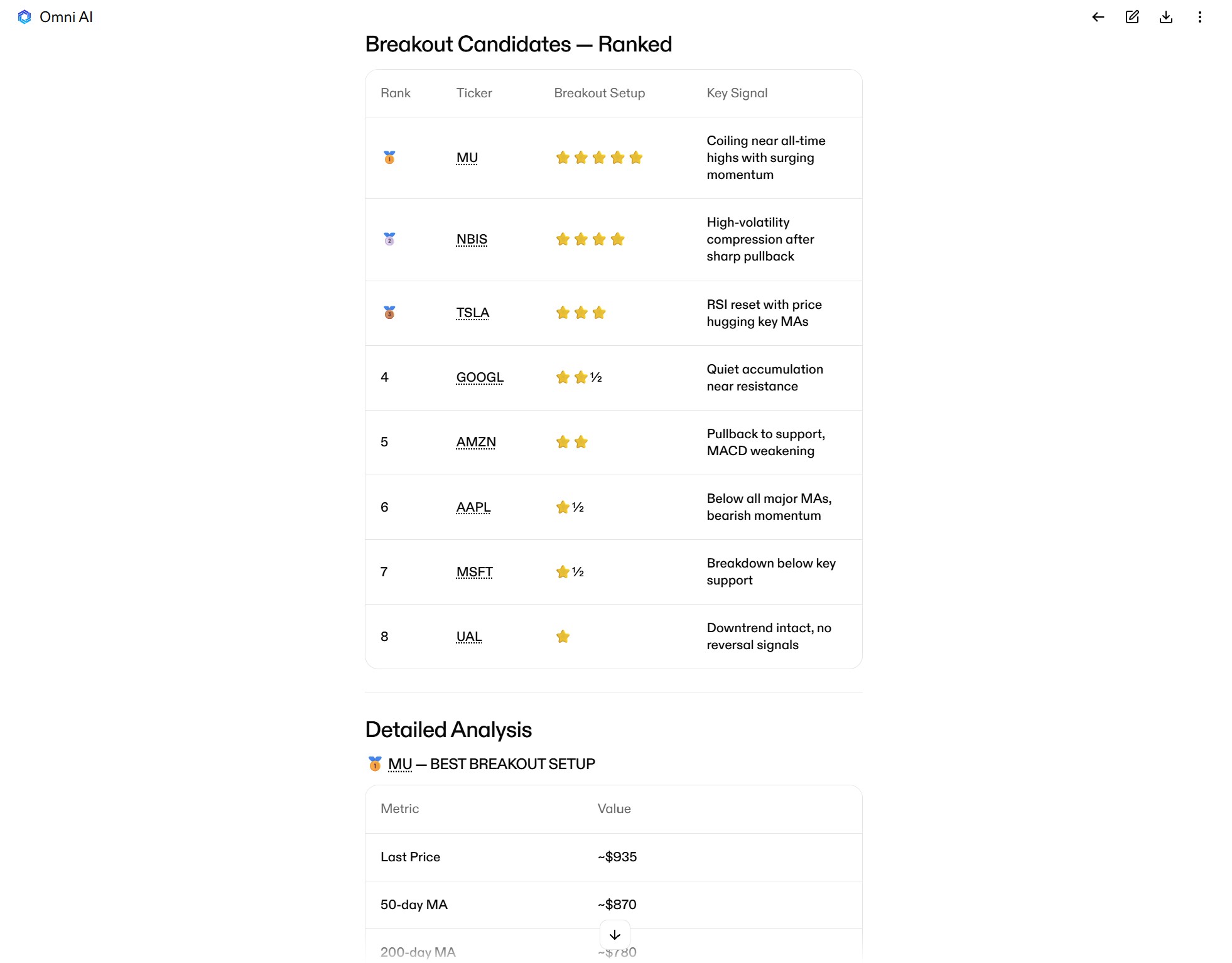
Once you find candidate tickers to trade from your watchlist, you can use Omni AI to analyze the individual setups in more detail and plan out your trades. It’s a fast, smart way to move from a list of tickers to a specific trade idea.
#3. Build intraday screens
Another powerful way to analyze the market and generate ideas with Omni AI is to build intraday screens using text prompts. For example, you can ask Omni AI to find stocks experiencing large moves on strong volume, list the biggest movers by sector, or highlight stocks reversing off a gap down at market open.
Here’s an example prompt: What biotech stocks are seeing a 5%+ gain today on above-average volume?
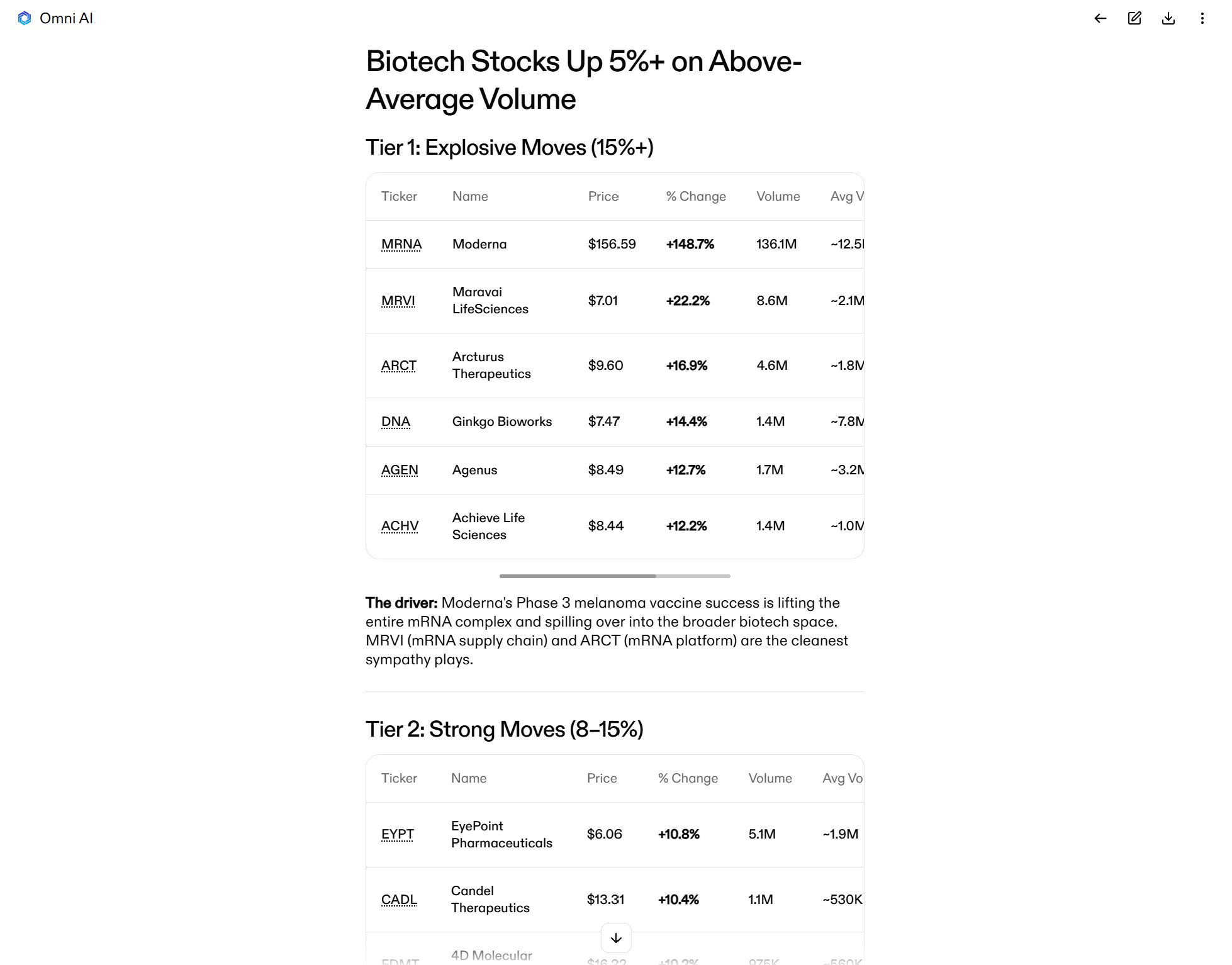
After identifying candidate tickers to trade, Omni AI can add them to a new watchlist or help you analyze them further. For example, you can ask Omni AI to explain the catalysts behind an unusually large move or rank each ticker’s potential for a trade.
#4. Identify promising setups
When you’re ready to start moving from researching tickers to planning trades, Omni AI helps by identifying promising setups and analyzing trade opportunities. It’s highly adaptable to your specific strategy, and you can prompt the chatbot to look for specific indicators or setup qualities.
Here’s an example prompt: Find stocks in the semiconductor industry that are experiencing an intraday reversal on strong 15-minute volume. Look for oversold RSI and a bullish MACD crossover on the 15-minute timeframe.
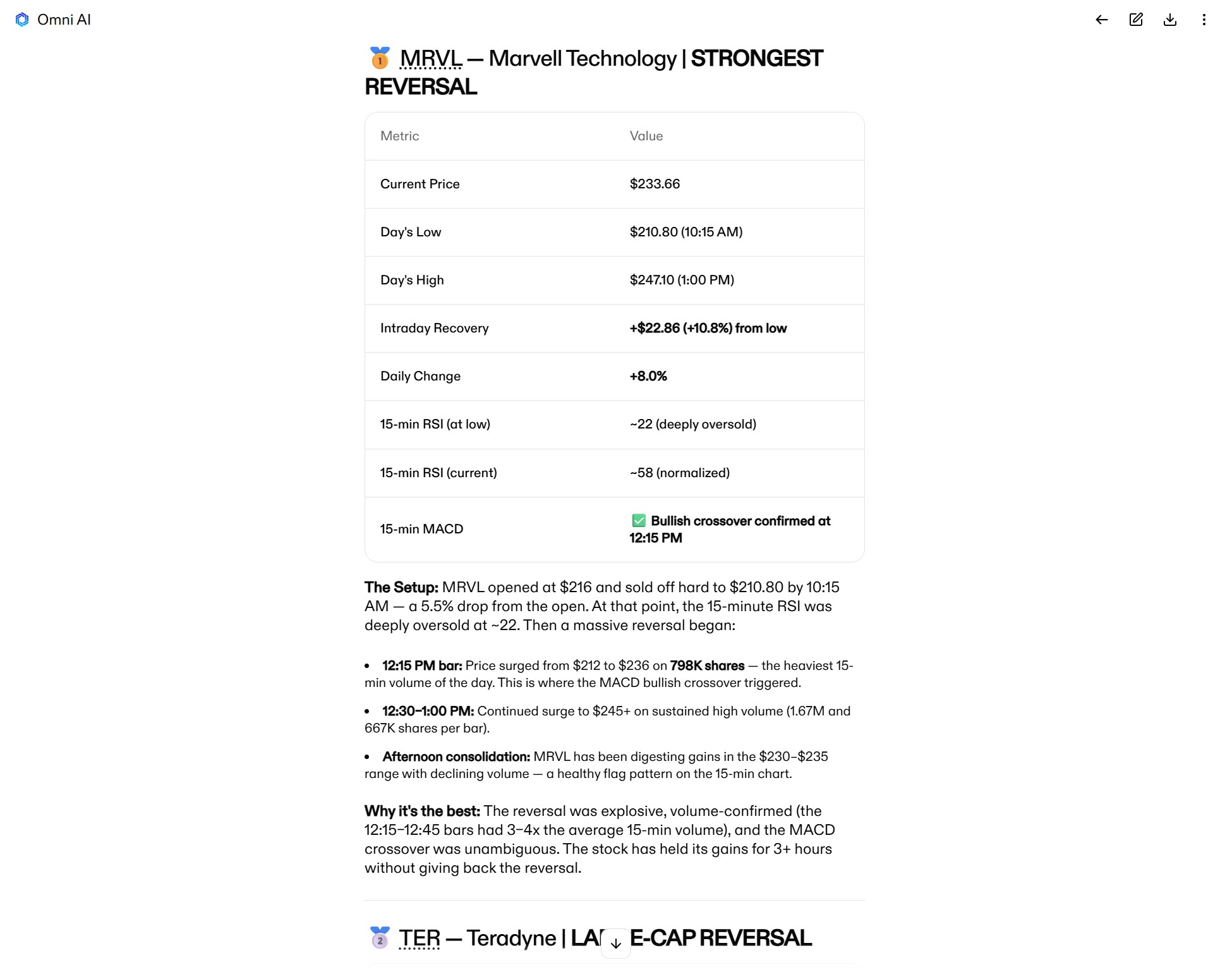
In addition to finding setups, Omni AI will rank them based on your criteria so you can quickly focus on the most promising opportunities.
If you’re still early in the idea-generation phase, Omni AI can also suggest setups based on topics or broad ideas. For example, you can ask the chatbot for the best trade setups in the market today, and it will return candidates for a variety of trade approaches, such as oversold stocks recovering on strong volume or weekly momentum leaders.
#5. Plan your entries and exits
After using Omni AI to identify a high-quality setup, the next step is to map out a trade plan.
Omni AI can help you find the best levels to enter a trade based on a variety of factors, including support and resistance areas, volume profiles, and your conviction in an idea. It’ll also recommend take profit and stop loss levels so you enter a trade with your entries and exits fully staked out ahead of time.
Here’s an example prompt: Build a trade plan around today’s NOW breakout. Identify entry, take profit, and stop loss levels to capture upside if the breakout continues, but protect downside if it fails.

Of course, it’s still up to you to review the trade plan and ensure it aligns with your strategy and risk tolerance. But Omni AI can help with this by tailoring the plan to a risk/reward ratio you specify or offering hedging strategies (more on that below). It can also suggest multi-level trade plans that combine aggressive and conservative entries to help you capitalize on a pullback to support without missing the move entirely if a stock runs without looking back.
#6. Analyze options strategies
Omni AI isn’t limited to helping with stock trades. It has access to real-time options chains and critical options data, such as bid/ask prices and implied volatility. So, you can use Omni AI to plan complex, multi-leg options strategies as well as trades combining stocks and options for any ticker.
A great way to use this capability is to ask Omni AI to build several trade options with different risk levels around your preferred setup. You can also ask the chatbot to identify strategies that achieve a defined risk/reward ratio, saving you a ton of time you’d otherwise spend combing through various contract combinations.
Here’s an example prompt: Design an options trade around AAPL that captures upside on a run back to all-time highs, but limits downside risk if the stock falls below key support on the daily chart. Show me strategies that offer a 3:1 reward/risk ratio at expiration.
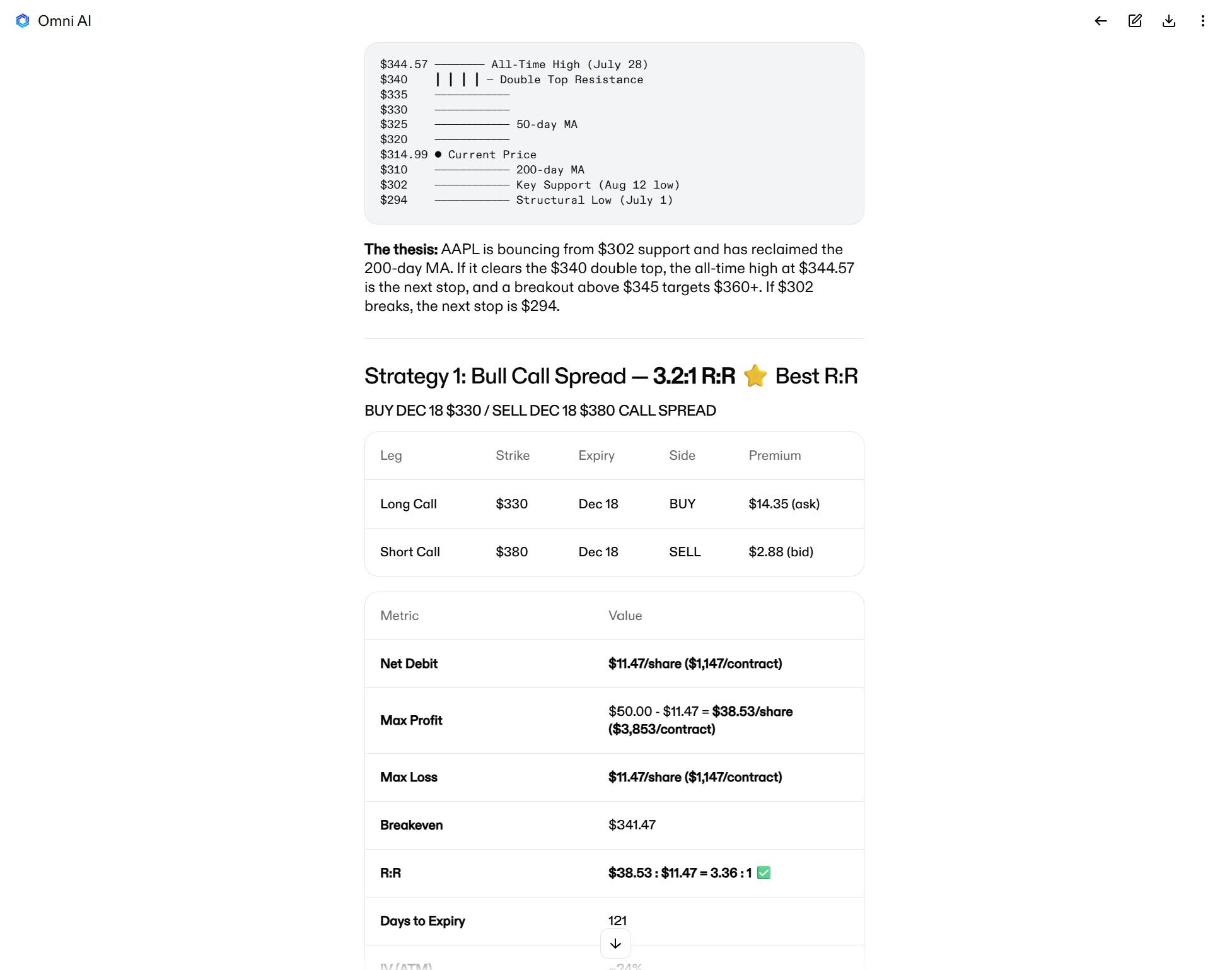
After you see the suggested trades, you can follow up by asking Omni AI to conduct scenario modeling for your preferred strategy. It can calculate your potential profit or loss if the ticker chops sideways for weeks or falls below a key support. You can also ask Omni AI for an exit plan for your trade, and it will offer actionable levels you can track.
This is a level of options trading capability far beyond what any all-purpose LLM offers. If you’re trading multi-leg options strategies, Omni AI is a complete game-changer.
#7. Manage risk with hedging strategies
Managing risk in complex trades is much easier with Omni AI. The chatbot supports multiple hedging strategies that you can customize to your trade and risk tolerance.
Examples of ways you can build hedging strategies with Omni AI include finding options positions that protect your downside without limiting your upside and planning pair trades that go long and short on correlated tickers. Omni AI will automatically find the right contract or the pair of tickers to trade to achieve your risk management objective — plus model your P&L under a variety of scenarios so you can evaluate the trade before execution.
Here’s an example prompt: Show me pair trades around NVDA's upcoming earnings report. I want upside exposure if NVDA pops, but I want to limit my downside if the earnings report disappoints and hits the semiconductor sector hard.

Even better, Omni AI has real-time access to your portfolio, open P&L, and account margin. If you already have open trades you want to manage risk around, the chatbot can see those positions and suggest hedges based on your current P&L. It’s a powerful tool for managing your risk comprehensively, not just with all-or-none stop losses.
#8. Build instant order tickets
Omni AI’s capabilities don’t end at research and trade planning. Unlike other chatbots, you can actually use Omni AI to place trades in your Clear Street brokerage account. It’s a start-to-finish trading sidekick that helps you execute on your best setups before the market moves.
You can ask Omni AI to stage order tickets for any trade you’ve discussed or tell it to build a new order from scratch. It’s easy to stage tickets for multi-leg options trades or prepare tickets for multiple tickers simultaneously, which is key for pair trades or trading multiple names in a single sector on a major catalyst.
Here’s an example prompt: Prepare an order for a trade on AMZN. I want to buy the underlying stock while protecting near-term downside with a short-dated put.
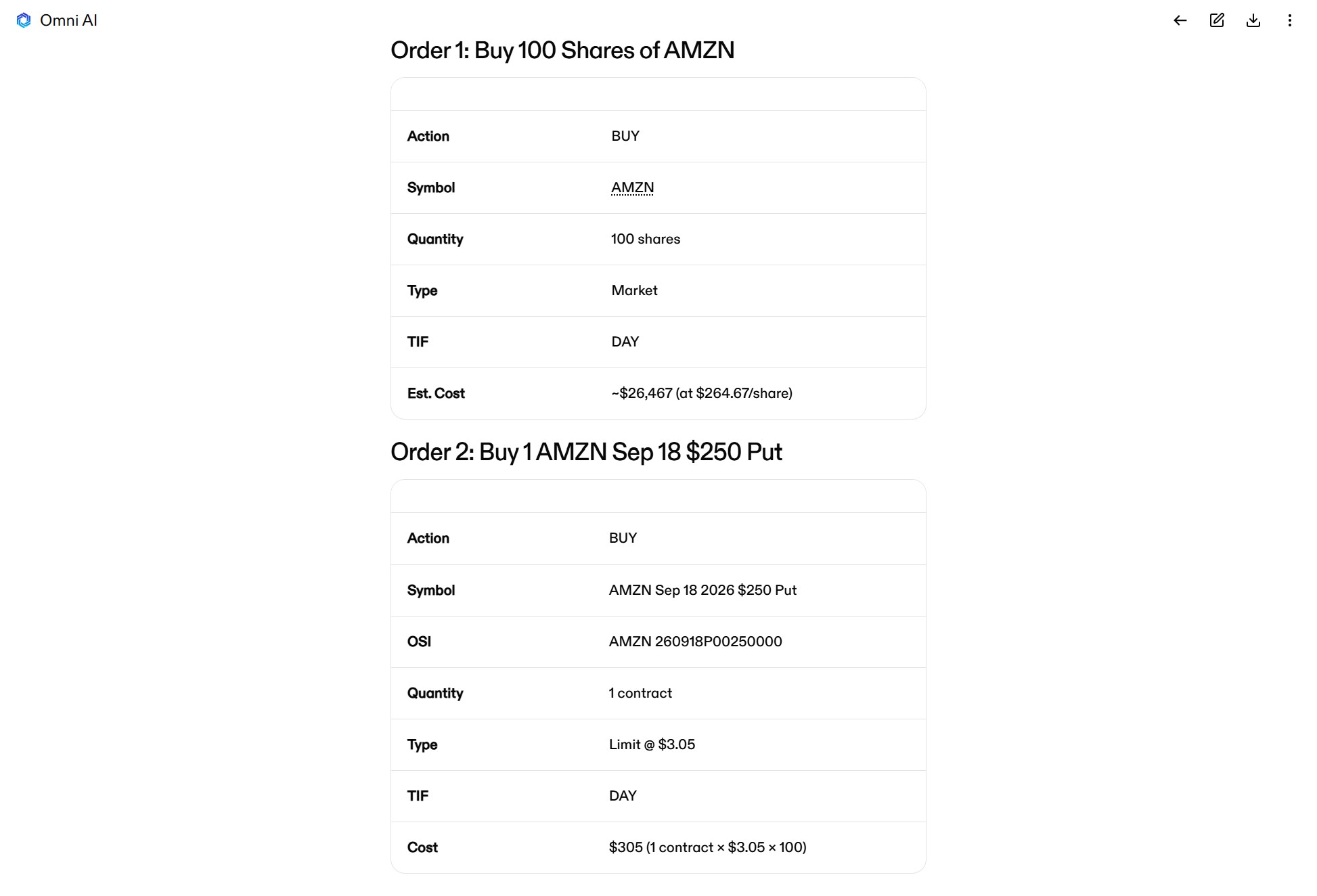
Omni AI can submit stop loss and take profit orders along with any ticket, so your risk is managed from the moment you execute. And of course, you’re always in charge — Omni AI will never send a ticket for execution without your explicit approval.
#9. Enhance your API workflows
All of these different ways to use Omni AI are accessible directly through Clear Street’s brokerage API. For traders with automated workflows, that means you can directly incorporate Omni AI prompts into your pipeline and create unique automations that extend well beyond what’s achievable with traditional API commands.
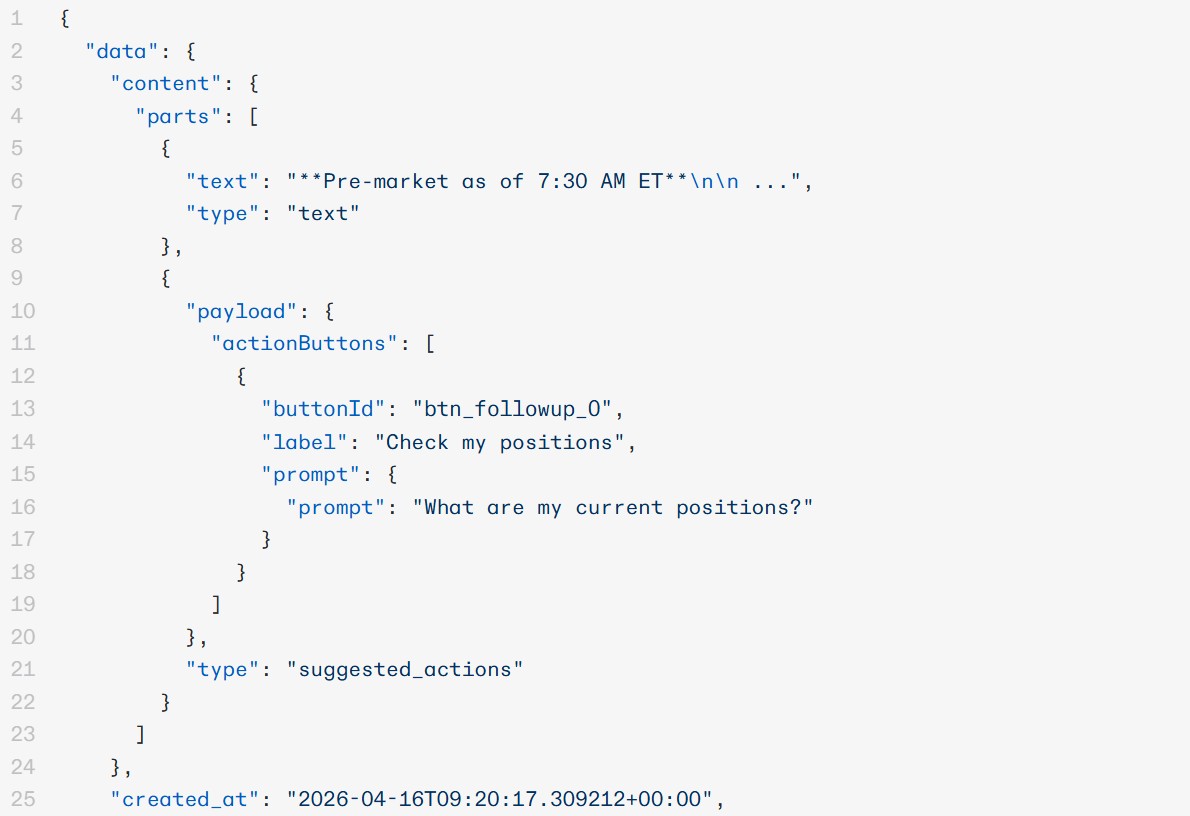
For example, you can use the API to automatically call Omni AI after an alert goes off and ask it to generate a trade plan for that ticker based on your strategy. Or you can automate Omni AI’s research and idea generation capabilities with a workflow that calls on the chatbot to identify and analyze high-probability setups at preset intervals, so you always have fresh ideas to trade.
Integrating Omni AI directly into your API workflows turns your scripts into a dynamic, context-aware trading system that can adapt to changing market conditions on the fly. It’s the perfect combination of automation and AI for trading.
Streamline your trading workflow with Omni AI
Omni AI is your start-to-finish trading assistant for research, trade planning, and execution. It helps you find the best opportunities every day, map out your entries, manage risk, and act before the market moves — all from within your Clear Street brokerage account.
Ready to take your daily trading workflow to the next level with Omni AI? Sign up for a Clear Street account today.
.avif)
.svg)