
Trading
Sep 30, 2026
Clear Street
What You Need in an MCP Server for Trading
.avif)
Find out what features you need in an MCP server for trading so you can confidently research and execute trades with AI
Introduction
LLMs like ChatGPT and Claude have the potential to act as your trading sidekick, helping you discover ideas, plan trades, and stage orders. But the keyword here is potential — by default, most AI chatbots don’t actually have access to real-time financial data, so they have very limited ability to support active trading.
The solution is to give your LLM access to critical real-time data, such as price quotes and technical charts, via a Model Context Protocol (MCP) server. But financial MCP servers differ significantly in data quality, breadth, and capability, so it matters which one you use.
In this guide, we’ll explain exactly what to look for in an MCP server for trading so you can choose the right one and start trading with AI.
What is an MCP server for trading?
Before we dive into what you need in an MCP server, let’s briefly recap how MCP servers work and why you need one for trading.
An MCP server acts as a gateway between your LLM (such as ChatGPT or Claude) and a database that might contain real-time price quotes and other key trading data. When you ask your AI a question, it passes the plain-English text to the MCP server. The MCP server then translates the text into a code-based database request, collects the necessary data, and passes it back to the LLM in a structured form the AI model can understand.
This matters because without an MCP server, AI chatbots don’t have a way to get real-time financial data from a reliable source. Trading with ChatGPT fails when you don’t know if the prices it’s quoting are up-to-date. When the data is coming from a financial MCP server you trust, you can actually believe what your LLM is telling you.
Key features to look for in an MCP server for trading
The challenge with using an MCP server for trading isn’t connecting your AI — all that requires is giving your LLM your MCP server’s address. Instead, the problem traders face is that there are so many financial MCP servers out there, and there are enormous differences in data quality and functionality.
Here, we’ll dive into the key things you need in an MCP server for trading and explain why they matter.
1. Real-time data for multiple asset classes
The most important thing you need from any MCP for trading is real-time price data. Financial MCP servers vary widely in what kind of price quotes they provide, so it’s important to think about what assets you actually analyze and trade using AI.
For stock trading, look for live quotes that are actually live. The best MCP servers use a tick-level WebSocket stream to deliver instant quotes. You typically have to pay for this kind of high-frequency data, but the alternative is a 15-minute delayed quote stream. That’s not very useful if you’re looking for a tight entry on a trade or using AI to map out risk/reward.
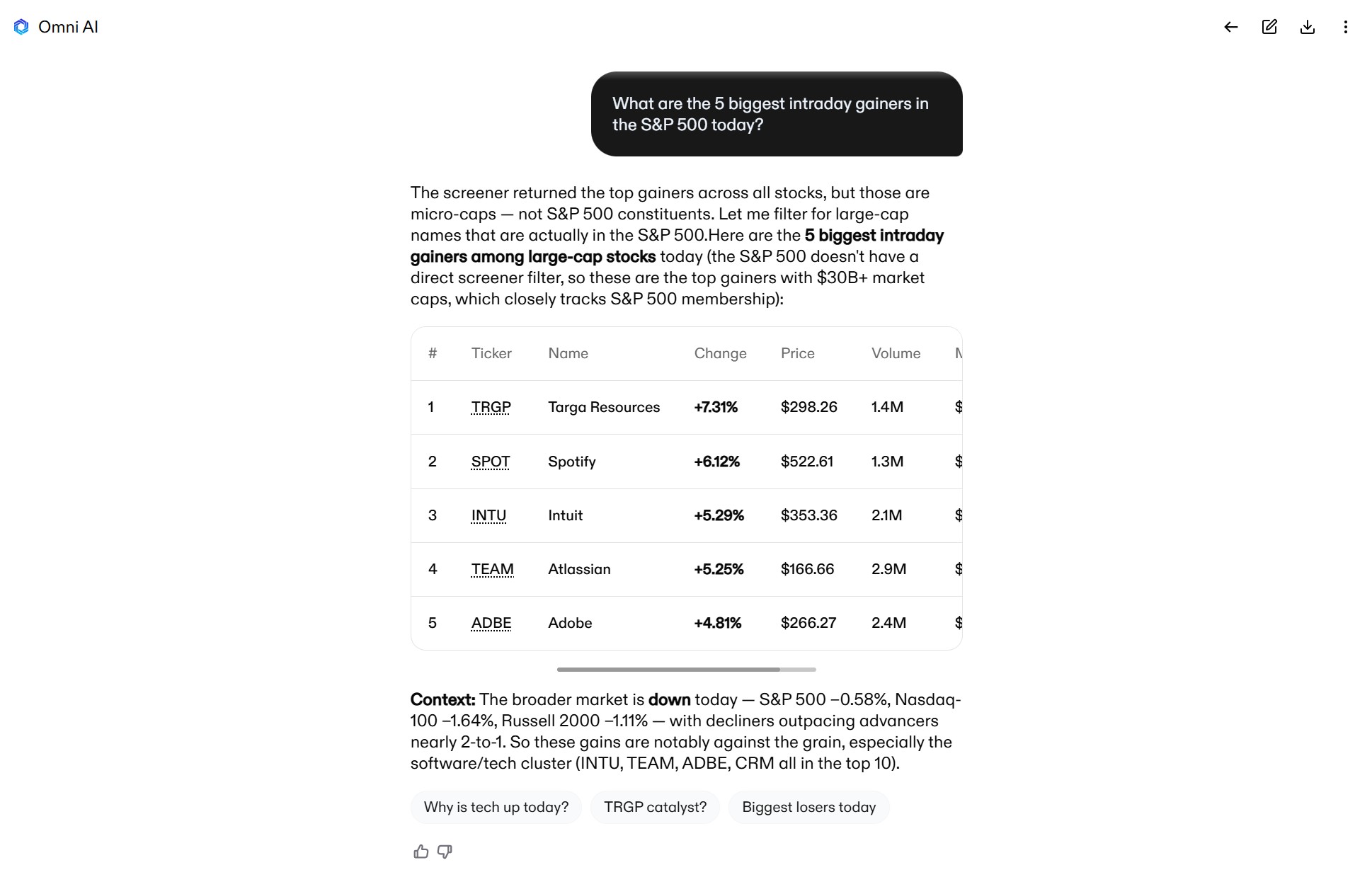
It’s also worth thinking about the breadth of price data you get. If you trade international stocks, look for MCP servers that pull quotes from international exchanges. If you’re backtesting trading strategies with AI, you’ll need split-adjusted historical data going back at least several years.
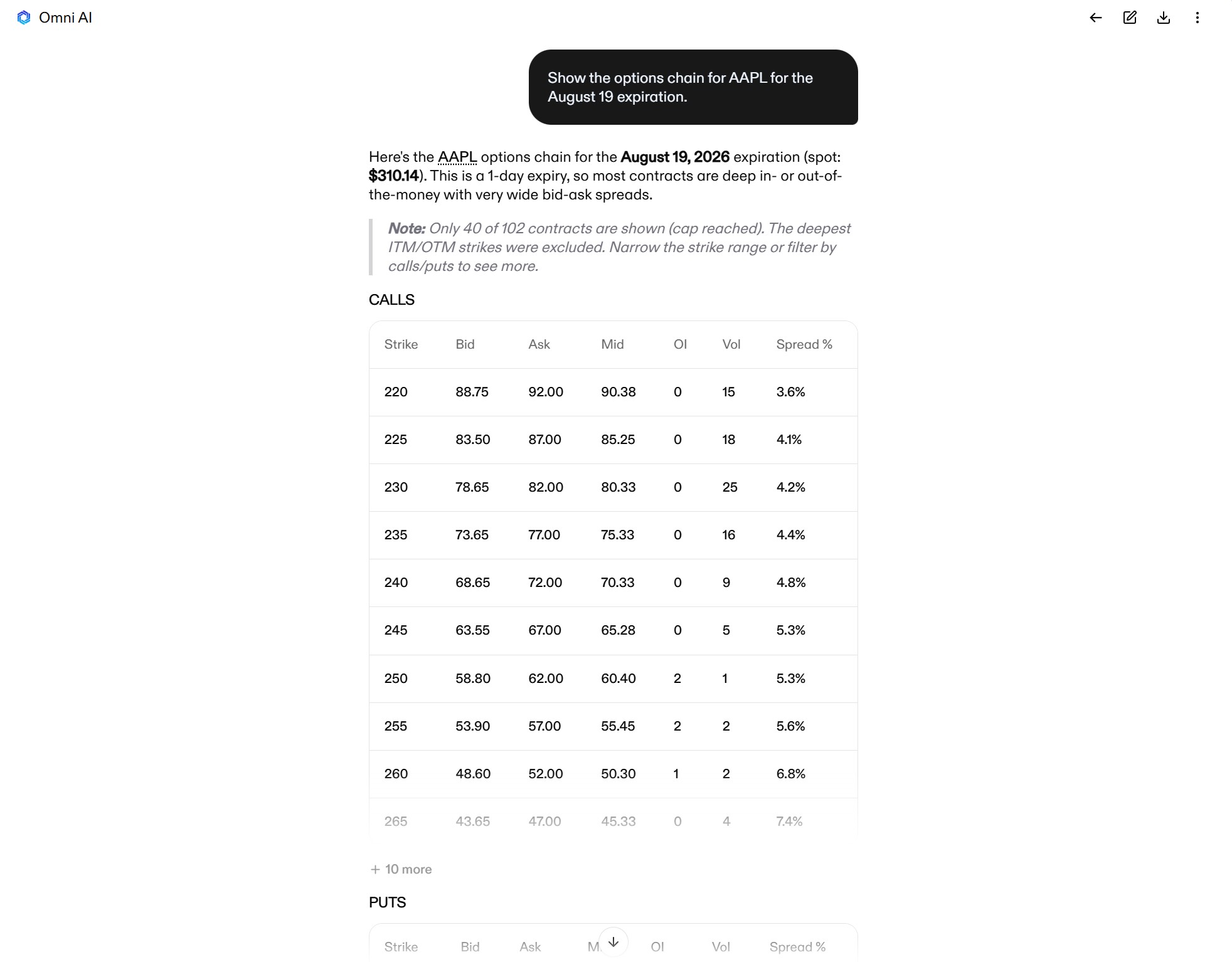
For options trading or strategies that consider options activity, you need access to real-time options chains from CBOE at a minimum. Some MCP servers offer chains from all the major U.S. options exchanges. Make sure your data feed includes single-contract details like options Greeks, implied volatility, bid and ask prices, and strikes across a variety of expirations.
For crypto trading, MCP servers should offer live quotes and order book data from multiple major exchanges. If you trade crypto futures, look for a server that includes current and historical perpetual funding rate data.
2. Comprehensive fundamental data
General-purpose LLMs have limited access to financial data, which is essential for performing basic fundamental research for swing trading and active investing. Worse, chatbots often make up the numbers rather than simply admit they don’t have them.
Your MCP server should provide more than just income statements and balance sheets. Look for datasets like:
- Valuation ratios (AI is very bad at calculating these on its own)
- Short interest
- Analyst price targets
- Insider trade history
- Congressional trades
- Earnings call transcripts
- SEC filings
- Institutional holdings
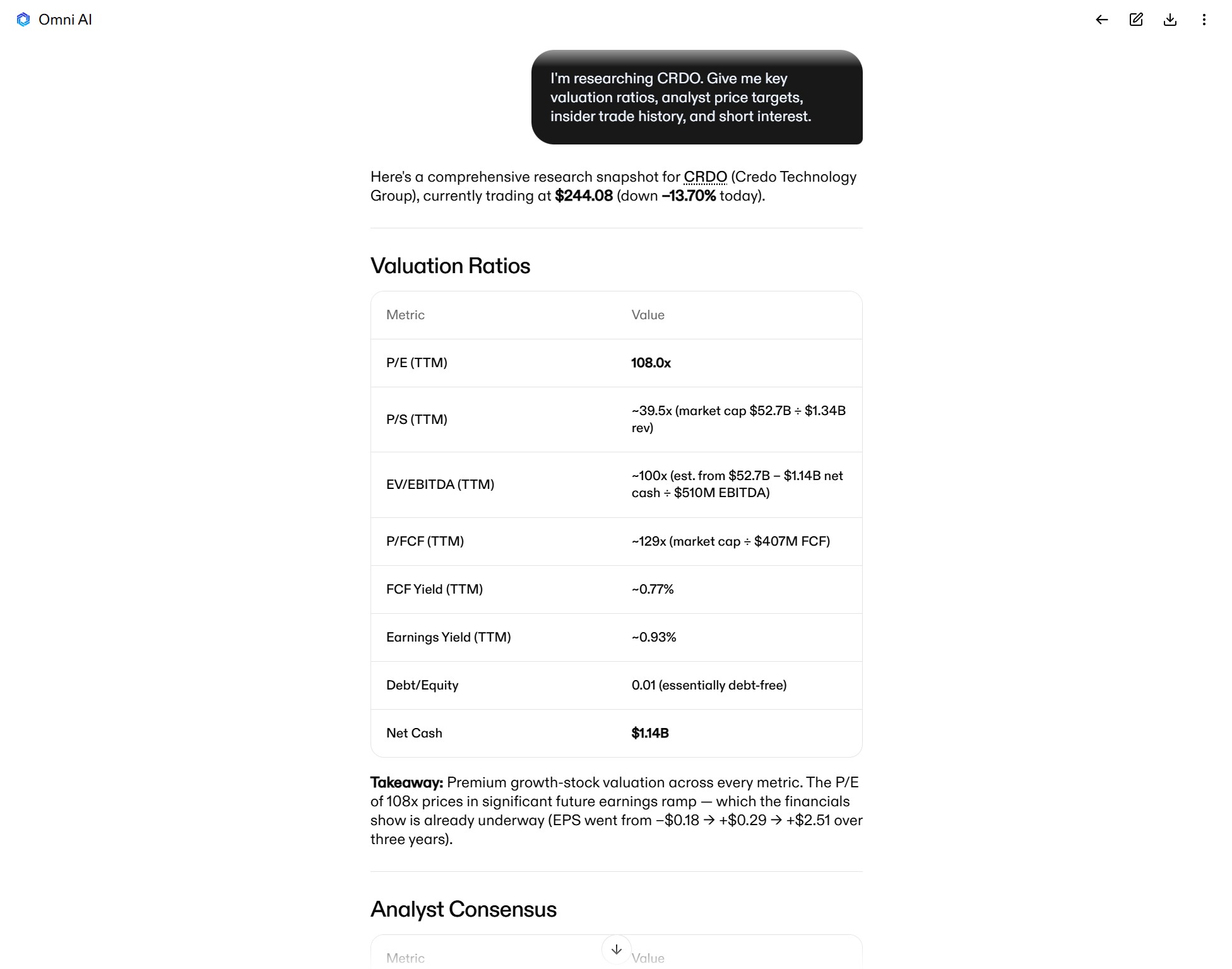
For filings and earnings call transcripts, make sure your MCP server provides access to the raw documents in an LLM-readable format, rather than just a summary. The server should also timestamp every data point so you know how fresh the data you’re looking at actually is.
3. Technical analysis capabilities
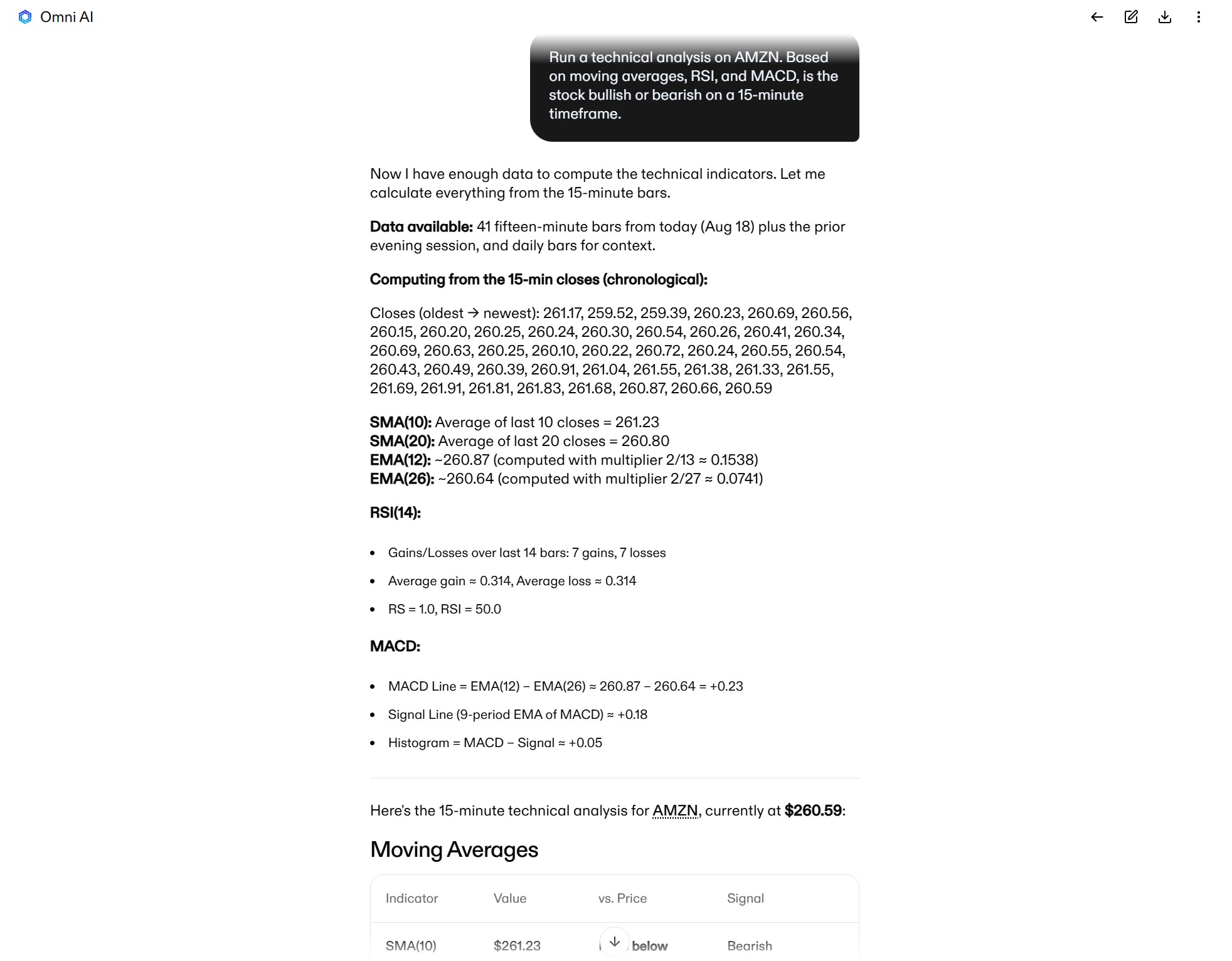
Your MCP server should also provide your AI with data for key technical indicators. LLMs are notoriously bad at math, so you can’t rely on your AI to calculate moving averages, RSI, MACD, or other basic indicators for you from price data alone.
Indicator data should be available for multiple timeframes down to at least 1 minute. If your trading strategy uses additional indicators such as Bollinger Bands, stochastics, or VWAP, look for an MCP server that can calculate them as well.
Another thing to look for is direct access to technical charts from TradingView or a broker’s trading platform. This can enable AI to analyze candlestick patterns, trendlines, and support and resistance levels. You can even give AI access to your custom charts, complete with indicators and annotations, to better tailor the analysis to your strategy.
4. Smart order execution and position management
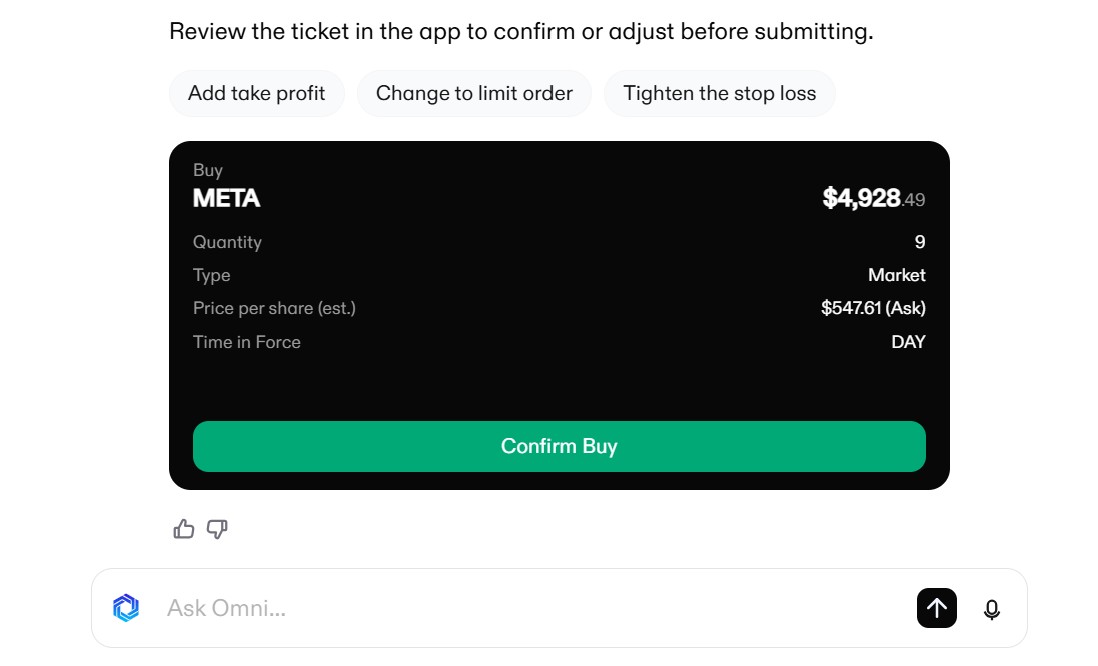
For your AI to go beyond research and idea generation and actually support trading execution, it needs to be connected directly to your brokerage account. MCP servers that provide brokerage account access enable AI to design trades and stage order tickets for you while accounting for your available buying power. They also enable your AI to execute trades, including placing stop loss and take profit orders, after you review the tickets.
For these execution-focused MCP servers, key capabilities to look for include the ability to prepare and execute multi-leg options strategies, place and manage trailing stops, and track open positions to identify overlap with new trades.
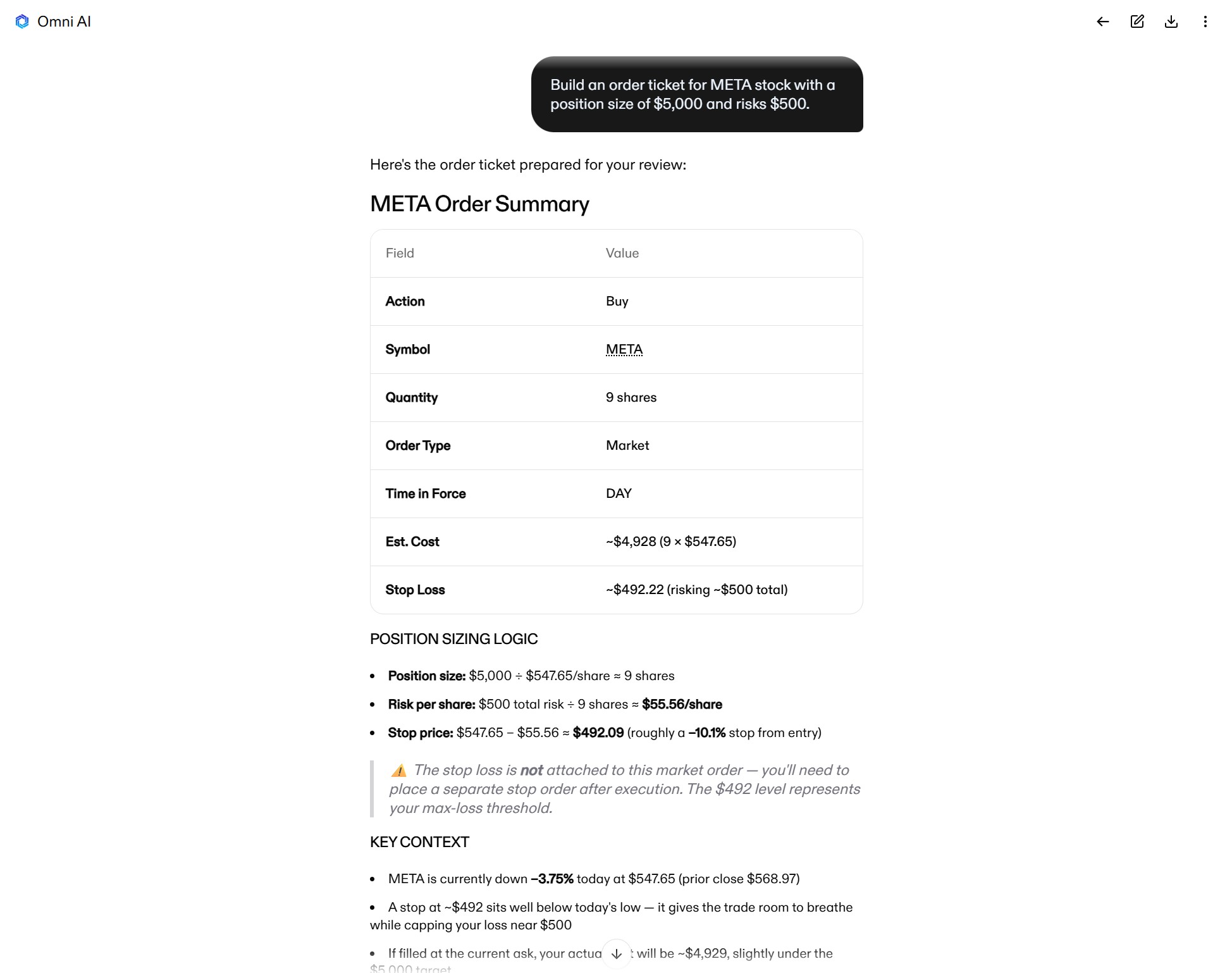
You should also look for dual-mode operation — an option to switch between a research-only environment that supports paper trading and an execution environment with live access to your trading account. Clear separation between these two environments prevents an overzealous chatbot from turning an idea into a trade without your explicit approval.
5. Token optimization
Since an MCP server interacts directly with your AI, the way that it handles incoming requests and returns data has a significant impact on how many tokens the LLM uses for each prompt. An unoptimized MCP server can flood your LLM’s context window, burn through tokens, and leave you with a hefty bill from your AI provider.
The simplest way MCP servers can optimize for token use is by being selective in what data they return. For example, if you ask for the day’s top gainers, an optimized MCP server will return the top 5-10 gainers instead of delivering thousands of tickers to your LLM and letting the AI figure out which ones moved the most.
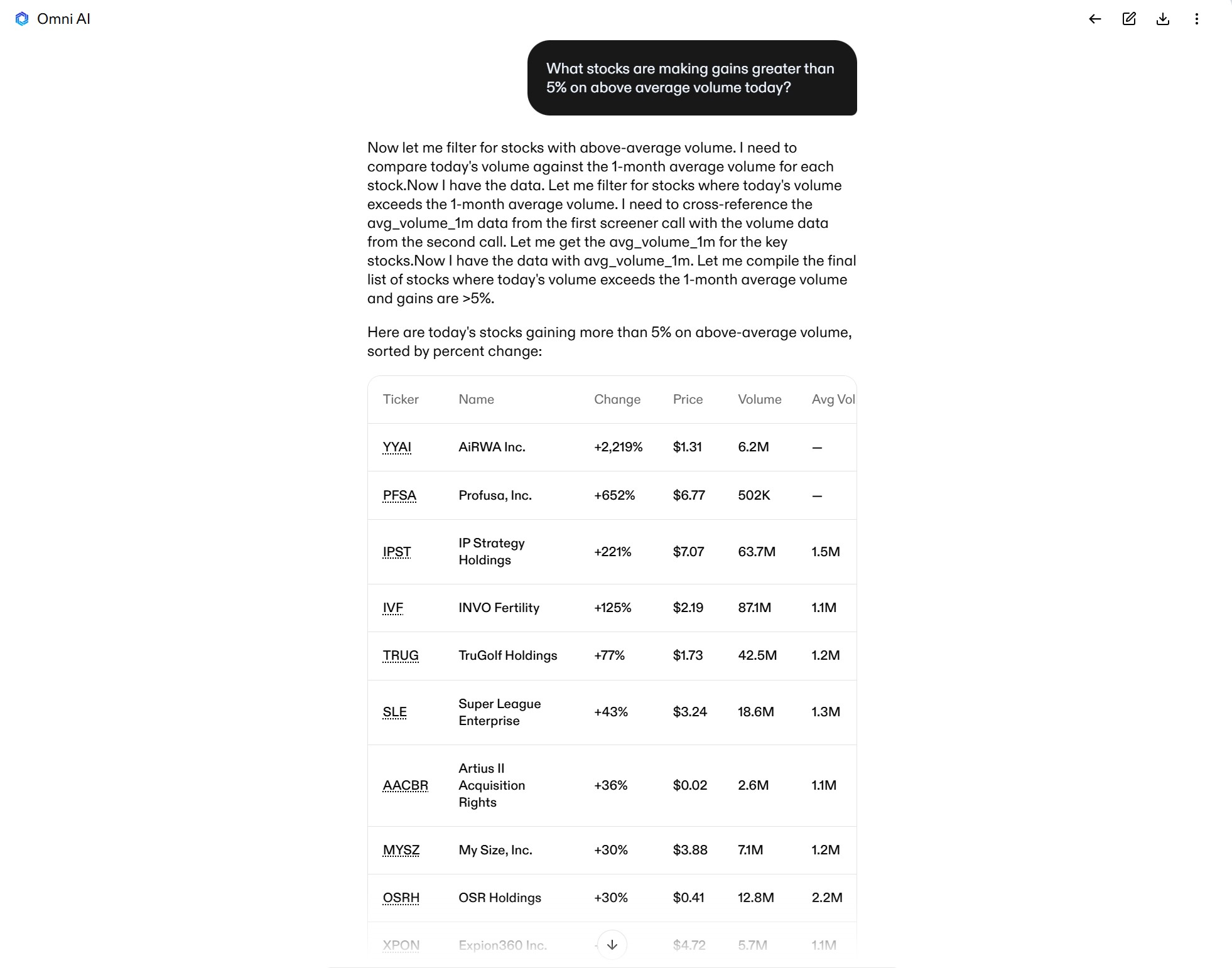
When comparing servers, look for commands such as get_symbol_summary or get_top_movers(limit=5) that let your AI retrieve only the data points it needs to answer your prompt.
Additional considerations when choosing an MCP server
There are a few additional factors to consider when choosing any MCP server (not specific to trading).
- Compatibility with your LLM: While most MCP servers can work with most LLMs, setting up a connection is much easier if the MCP server provides a ready-made configuration file for your chosen chatbot. Look for an LLM-specific code snippet you can copy and paste directly into your AI’s config file.
- Connection speed and uptime: MCP servers should be fast, reliable, and stable. Avoid servers that frequently drop your connection or that take more than 1 second to return data to your AI.
- Clear documentation: It’s up to an MCP server to tell your LLM what data retrieval commands it offers and when they should be used. Look for servers that offer clear, human-readable documentation. If you can understand what the tools do, your AI can, too.
- Active development: Look for MCP servers that are backed by professional developers or companies. It’s crucial that your server is up-to-date with the latest MCP protocol changes and that the databases you’re accessing are actively maintained with trustworthy data.
Combining research and execution MCP servers for trading
Many MCP servers are built for either fundamental research or live trading — not both. Trading-focused servers usually offer only barebones fundamentals like financials and valuation ratios. Research-focused MCP servers don’t connect to your brokerage account, adding serious friction to your trading.
One solution is to connect two or more different MCP servers within the same LLM workspace. This enables you to mix-and-match your favorite datasets and build a custom workspace that’s perfectly suited to your trading strategy.
However, using multiple MCP servers simultaneously has serious drawbacks. Your AI has to learn and remember every active command for every connected MCP server, which eats up the model’s context window and costs unnecessary tokens.
A better alternative is to use an MCP server like Clear Street that combines research and execution. Clear Street’s MCP server pairs institutional-grade market data, real-time stock and options quotes, and direct brokerage access. This allows you to screen intraday setups, plan trades, and stage and execute orders within a single, streamlined AI workspace.
Protecting your account while trading with an MCP server
Giving AI access to your live trading account introduces serious risk if safety controls aren’t built into your MCP server. Every trading MCP server with execution capabilities should have these safety features at a minimum:
- A two-step execution workflow that requires human review and approval before every trade. AI shouldn’t be able to place trades autonomously.
- Unique order IDs for every draft ticket to prevent AI from submitting the same order twice if its connection to the MCP server drops or times out.
- Forced price refreshes when an AI is preparing order tickets. Otherwise, an LLM might reference a price quote from earlier in the chat that’s no longer up-to-date.
- A research-only server environment that doesn’t support execution. You can use this environment for trade planning or to test your AI’s execution behavior in paper trading before going live.
- OAuth 2.1 authorization to give your LLM access to your brokerage account while keeping your credentials fully encrypted throughout your session.
Free vs. paid MCP servers for trading: What’s worth the money?
MCP servers can be free or paid, and there’s often a big difference in quality.
Free MCP servers typically offer delayed price quotes and limited datasets. They’re good for generating market reports, fundamental research into tickers or sectors, and analyzing daily stock charts. They can also be used for planning longer-period swing trades where a 15-minute delay in price data doesn’t matter, but make sure you’re aware of the time delay.
Paid MCP servers offer real-time price quotes and deeper datasets. They’re essential for using AI for intraday screening, technical analysis, and execution. Just make sure the datasets you’re paying for match your trading style and research needs.
Increasingly, brokerage firms are offering paid-quality MCP servers for free when you open an account. For example, Clear Street’s MCP server is included at no cost with every account, and you can use Clear Street’s Omni AI LLM to trade with the MCP server without paying for tokens.
Unlock AI trading with Clear Street’s free MCP server
Clear Street’s MCP server for trading unlocks your AI’s full capabilities with in-depth financial research, technical analysis, and trade execution tools. It offers real-time price data for stocks and options, reliable intraday screening and analysis, and seamless trade planning and execution.
Open a Clear Street account today to access the best trading MCP server and turn your AI into a powerful trading sidekick.
.avif)
.svg)