Screening
Nov 13, 2026
Clear Street
AI Stock Screeners: Turning Trading Criteria into a Focused Watchlist

Learn how to build custom real-time stock screeners with AI and turn your trading criteria into a focused watchlist.
Stock screeners are essential to building daily watchlists and finding stocks with actionable intraday setups in real time. But traditional screeners can also be a bottleneck in your workflow thanks to overly rigid filters or parameters that don’t fully capture complex trading strategies.
AI stock screeners can eliminate these constraints by allowing you to create fully custom stock screeners with plain-English prompts. Just describe your idea, and AI can quickly build filters that capture the full complexity of the setups you’re looking for.
In this guide, we’ll walk you through how to build stock screeners with Clear Street’s Omni AI and share actionable examples you can follow to create your own custom screeners.
Before You Start: Choosing the Right AI to Build Screeners
Most AI chatbots—including Claude and ChatGPT—don’t have access to real-time market data by default. In order to use these AI chatbots to build stock screeners, you first need to connect them to a financial model context protocol (MCP) server that provides access to live data.
Clear Street’s MCP server is included with every account and provides your AI with real-time price quotes, key technical metrics, financial news, options chains, and much more. It’s an essential piece of technical infrastructure for creating stock screeners with your AI chatbot.
Alternatively, you can use Clear Street’s Omni AI trading assistant, which is designed specifically for trading and has access to live market data without any extra setup required. Omni AI can build screeners, manage your trading watchlist and help you go from finding ideas to trade planning and execution.
We’ll focus the rest of this guide on building stock screeners with Omni AI, but the process is similar for other AI chatbots connected to Clear Street’s MCP server.
How to Build Stock Screeners with Omni AI
Building stock screeners with Omni AI is simple. Just provide the chatbot with your screening criteria or describe your trade idea, and it’ll quickly deliver matching tickers based on real-time data. Screening criteria can be fundamental, technical, or descriptive.
Let’s look at a few examples of custom screens you can build with Omni AI.
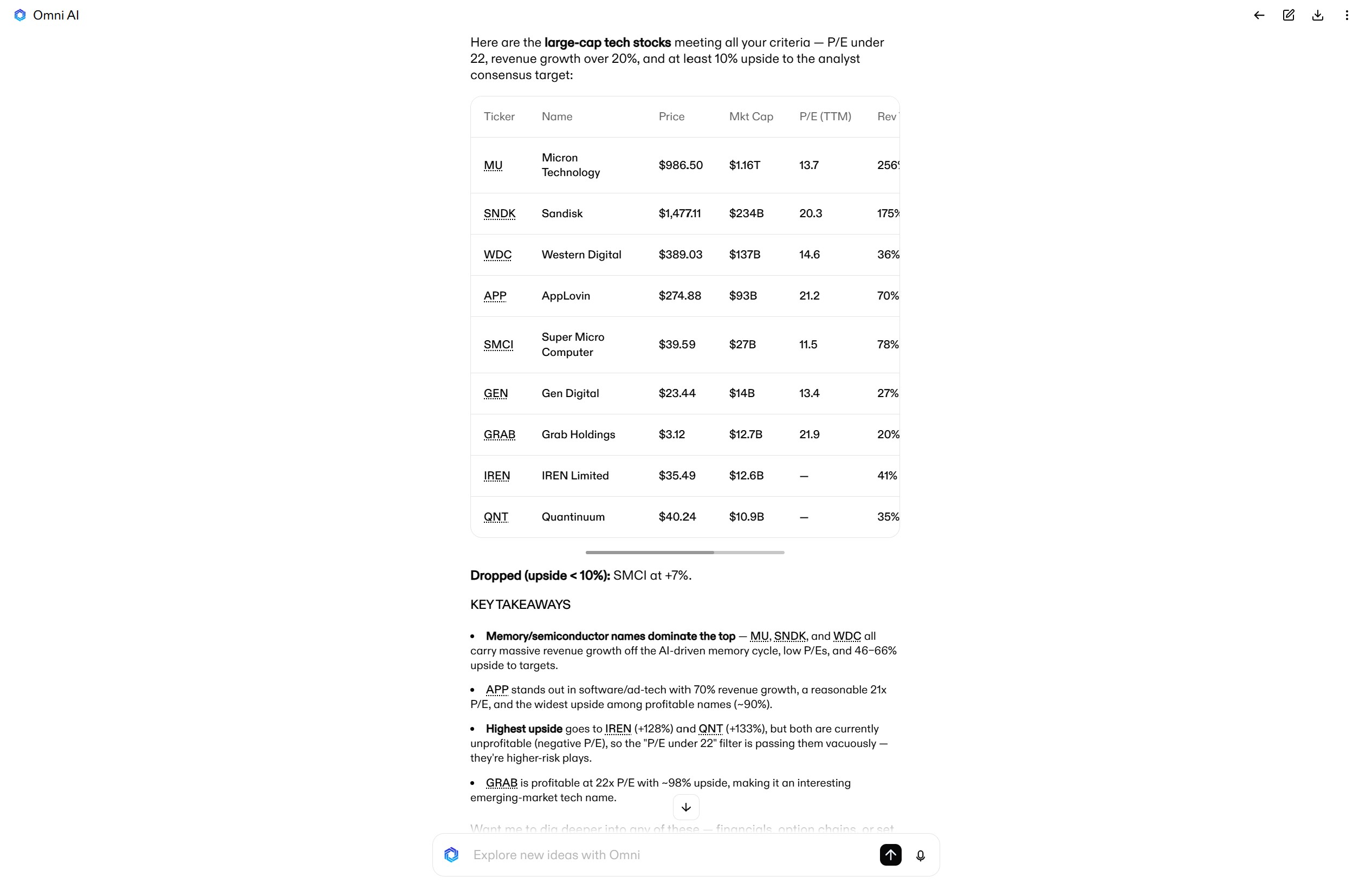
Example #1—Growth at a Reasonable Price:
Scan for large-cap tech stocks with P/E under 22, revenue growth over 20%, and an analyst consensus price target at least 10% above the current price.
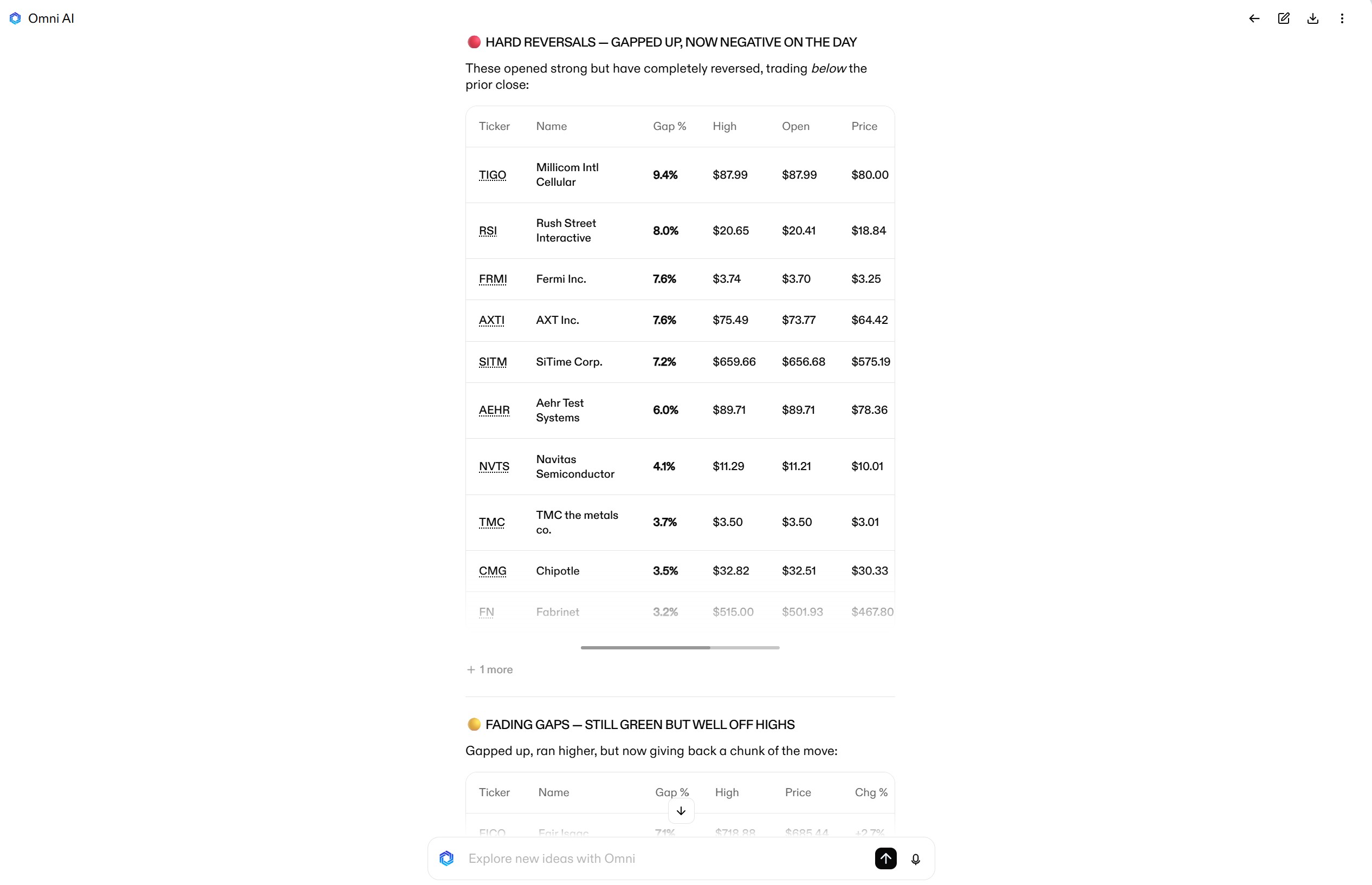
Example #2—Gap and Reverse:
I want to see stocks that gapped up at open and saw early follow-through, but are now showing signs of reversing intraday. Focus on stocks with at least a 3% gap and market cap of at least $1B.
Example #3—Momentum Stocks:
Show me large-cap stocks that have bullish moving average stacks (daily 20 > daily 50 > daily 200), RSI above 50, and a bullish MACD crossover in the last 3 days.

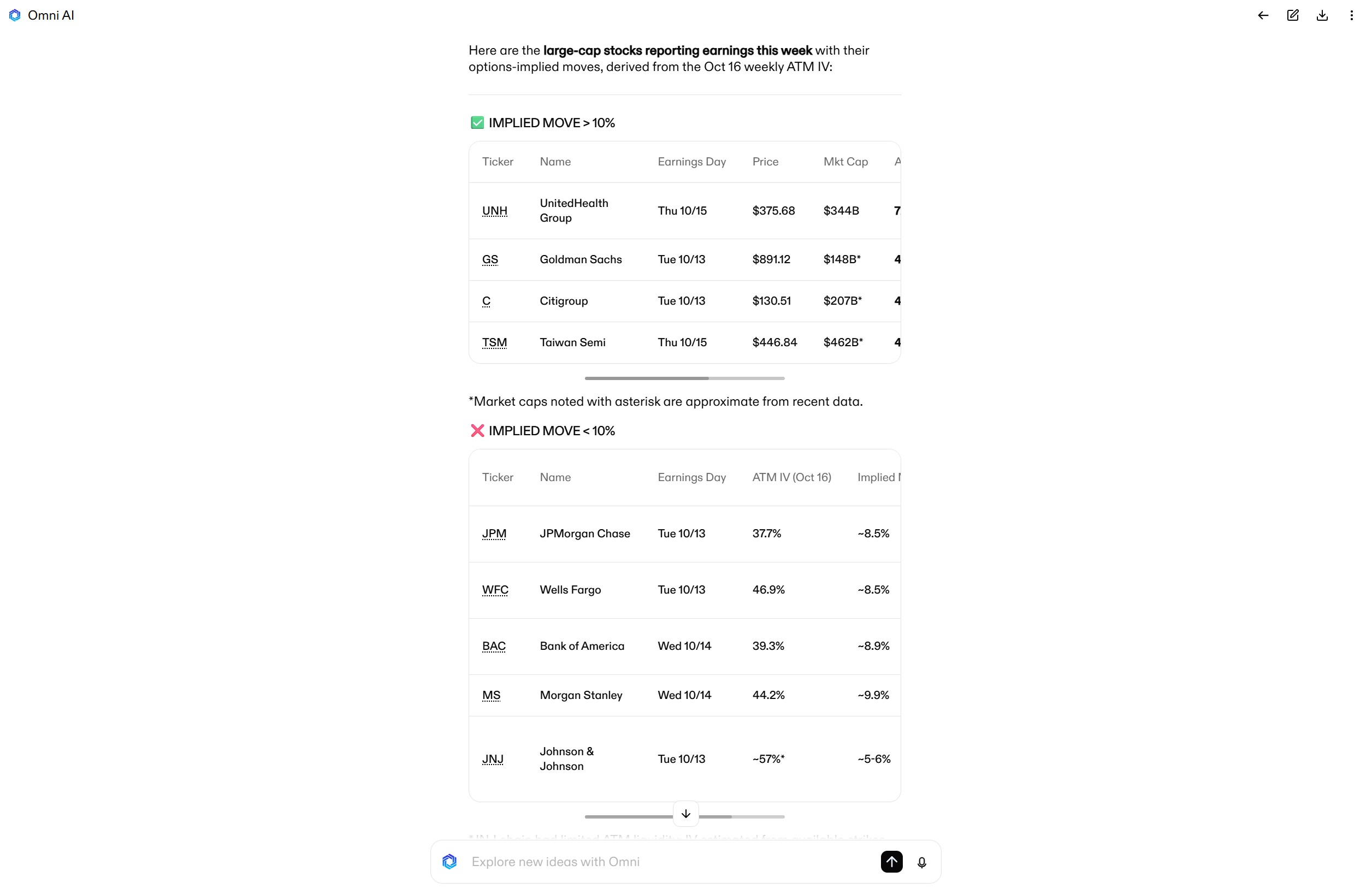
Example #4—Upcoming Earnings Volatility:
Screen for large-cap stocks that have earnings this week with options-implied moves of greater than 10%.
Adding Screener Results to Your Watchlist
After Omni AI delivers screener results, you can ask it to sort tickers based on any criteria or add additional filters to narrow down the list. You can also ask for additional information or analysis, including comparing fundamentals or technicals for stocks in your screener results.
Once you have a list of tickers you want to investigate further, Omni AI can add them to your watchlist or turn them into a daily focus list.
Just ask:
Add these tickers to my watchlist or Build a daily focus list with these tickers.

Tips for Building Your Own Stock Screeners
Omni AI makes it easy to create stock screeners using plain English, but getting the prompt right is critical to getting the screener you want. Here are a few tips to help you choose the right criteria.
- Search for lookalike stocks: If you have a ticker or setup you like, Omni AI can help you find similar stocks. For example, you can tell it to find stocks that have similar technical or fundamental qualities to a ticker you’re watching closely. It’ll explain what makes each ticker alike, which can help you identify criteria for a screener.
- Reverse-engineer your thesis: You can also give Omni AI a broad market view, and it’ll automatically translate that into screener criteria. For example, if you think the Fed will stop hiking rates, it’ll build a screen for rate-sensitive stocks by looking at sector exposure, debt-to-equity ratios, price-to-free-cash-flow, and more. You can then narrow down the results or build a refined screen around similar-looking stocks it surfaces.
- Look through your past setups: Evaluating charts for setups you’ve traded successfully is a good way to identify common technical patterns or catalysts to trade around. Omni AI can help you with this pattern recognition if you ask it to evaluate your entries on a subset of recent trades.
- Combine technicals and fundamentals: Setups that combine technical strength, fundamental strength (e.g. earnings growth), and broader context like sector strength are often stronger than those with just one strength. Omni AI can help you screen across these parameters, plus point you towards hot sectors or tickers with upcoming catalysts.

Upgrade Your Screeners with Omni AI
Omni AI makes it easy to turn any idea into a stock screener in seconds and find actionable setups throughout the day. It’s fast and flexible, giving you the freedom to build complex screens that are difficult to achieve with traditional screeners.
Open a Clear Street account today to try Omni AI for yourself and start building your own custom screeners.
Products and services offered by Clear Street LLC, member FINRA, SIPC, CFTC and NFA. Additional information about Clear Street is available on FINRA BrokerCheck, including its Customer Relationship Summary.
Clear Street does not provide investment, legal, regulatory, tax, or compliance advice. Consult professionals in these fields to address your specific circumstances. These materials are provided for informational purposes only and subject to change without notice or obligation to replace any information contained therein. This is not an offer, solicitation of an offer, or advice to buy or sell securities, or open a brokerage account in any jurisdiction where Clear Street is not registered. Securities trading, particularly trading on margin or using options, involves significant risk and is not suitable for all investors.
Related blogs