
Trading
Oct 22, 2026
Clear Street
Claude for Trading: How to Use It and Where It Breaks

Learn how to use Claude for trading effectively and where it falls short. We cover top use cases with example prompts.
Claude and other AI chatbots can be powerful tools for traders, speeding up research and helping you think through trades. Used well, Claude can help you test ideas and review your process. Trading involves risk, and results vary.
But Claude wasn’t designed for trading, and it has serious limitations that traders need to be aware of before trading with the help of a chatbot. In this guide, we’ll highlight several ways you can use Claude to enhance your trading, with example prompts, and point out where you need to be careful when using it.
Before You Start: Give Claude Your Trading Context
Claude is a general-purpose chatbot, so when you start a new conversation, it’s as ready to tell you about astrology as it is to help you trade. To get Claude in the right “mindset,” it’s a good idea to start the conversation by telling it how you plan to use the chatbot and give it some context about your trading style.
A simple approach is to initialize the chatbot with a descriptive prompt. For example:
I’m a swing trader focused on trading stocks with a 1-2 week timeframe. I focus on momentum setups, such as breakouts above resistance or strong multi-day trends. I want you to act as my trading assistant, helping me analyze market conditions, evaluate candidate setups, and maintain my edge.
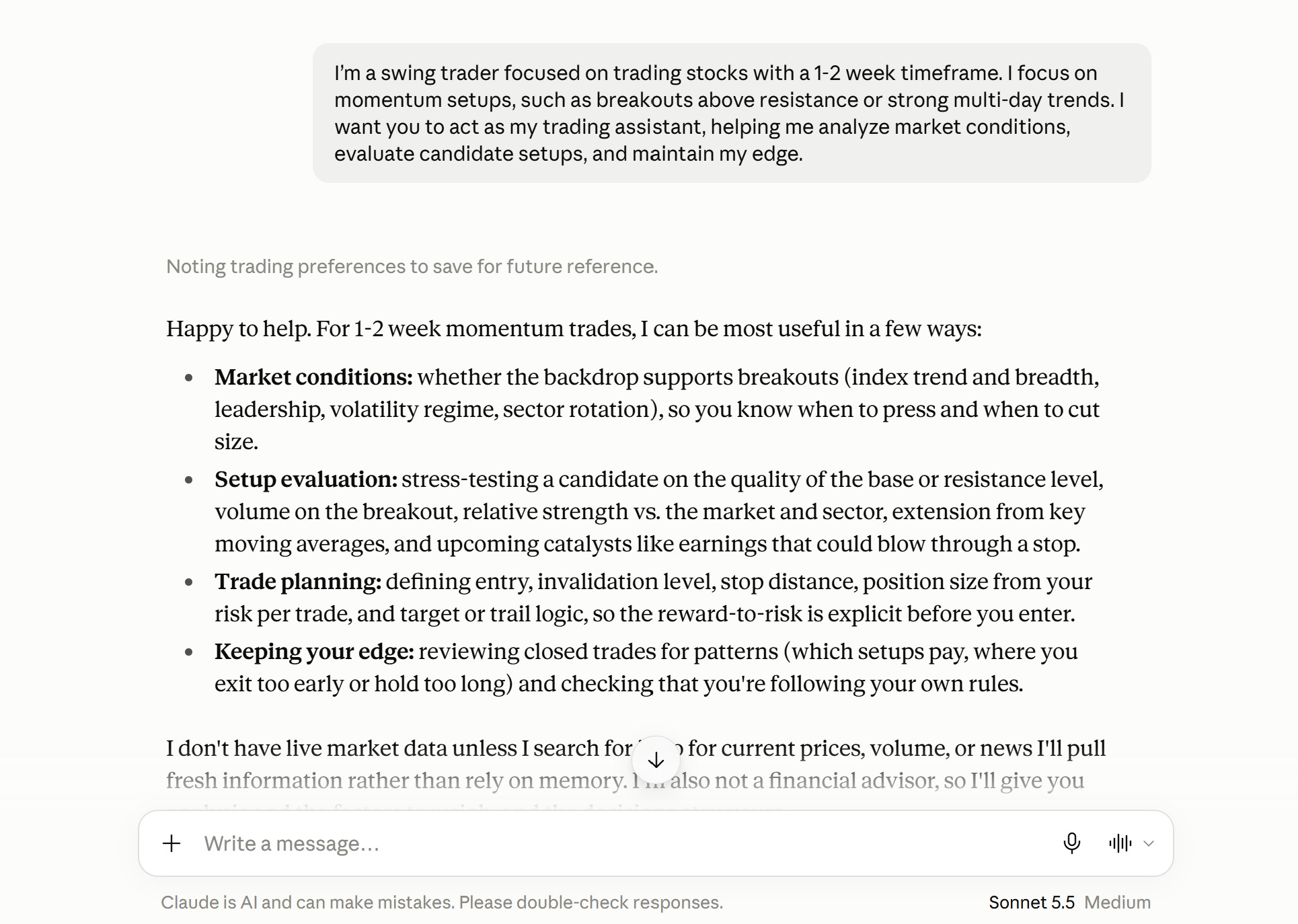
You can even prompt Claude with specific trading rules, such as avoiding trades before 10am Eastern, and ask it to remind you if a trade you’re discussing might violate them. It’s a simple but effective way to put guardrails on your conversation and prevent the AI from encouraging you to take trades that don’t fit your strategy.
5 Ways to Use Claude for Trading
Claude excels at trading tasks that aren’t time-sensitive and don’t rely on real-time price quotes, like general research and analysis. Here are a few ways you can use the chatbot to help you trade.
Broad Market Research
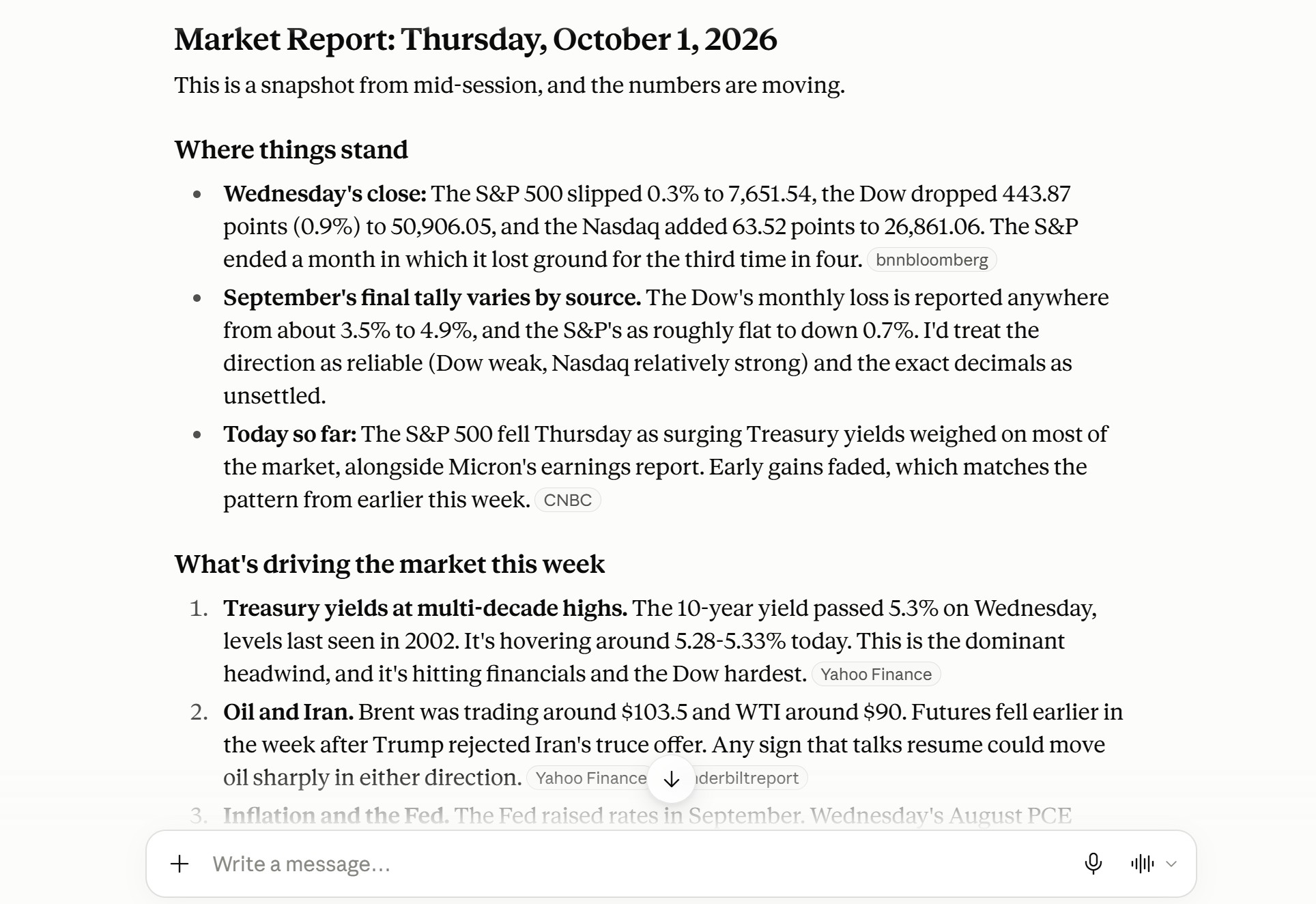
Claude works impressively well for broad market research that most traders do at the start of each day. It can summarize key events like upcoming earnings and macroeconomic releases, tell you about important overnight news, and even highlight changes in trader sentiment.
You can also use Claude to recap the previous trading session, including identifying the specific headlines or drivers behind major market movements. Or, widening your lens, you can use Claude to identify common themes from recent earnings calls to get a handle on consumer sentiment, AI-driven revenue growth, or supply chain impacts.
Claude can also look under the market’s hood, analyzing metrics like the advance/decline ratio and market breadth to help you gauge trend strength. Asking the chatbot to summarize moves in the bond, crypto, and commodities markets can give you a clearer picture of the market regime.
Just be cautious using Claude for any market research that relies on live market data. For example, it can deliver incorrect information about which stocks are seeing the biggest price movements or volume in pre-market. Claude can also stumble when asked about earnings releases from the past 24 hours, especially if those earnings are having a large impact across the market.
Here’s an example prompt to use Claude for market research:
Build a market report for the upcoming trading day. I want to know what catalysts are driving the market this week, what earnings reports or macroeconomic releases traders are watching, and whether sentiment is bullish or bearish.
Individual Stock Analysis
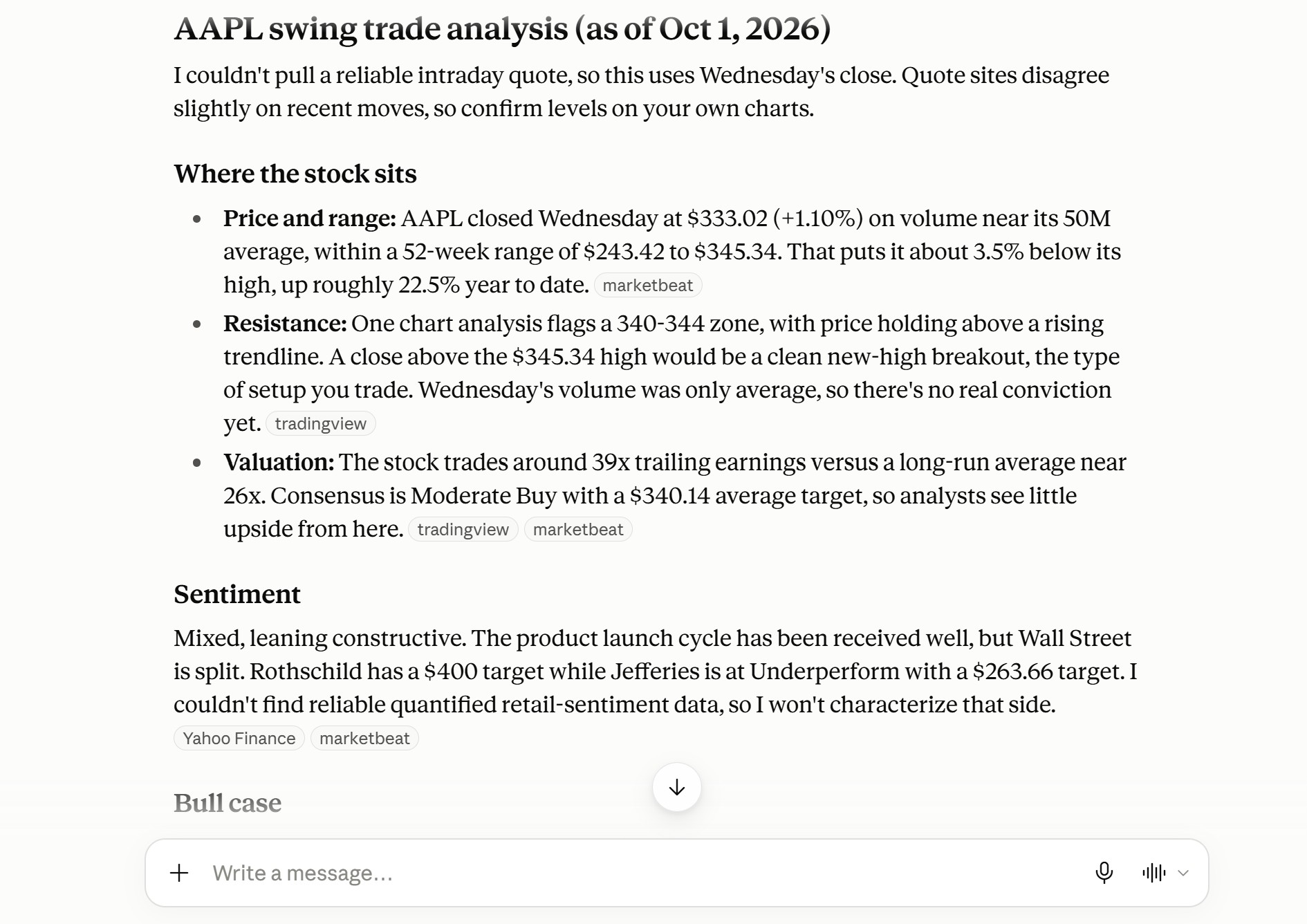
Another powerful way to use Claude is to conduct research on an individual stock. For example, you can ask it to evaluate sentiment around a ticker along with the medium-term bull and bear cases for the company. It’s also great at summarizing earnings reports or explaining how a piece of news or macroeconomic trend might impact a particular stock.
You can also get more creative with your analysis. For example, you can use Claude to dig into a company’s revenue breakdown to see which business lines are powering growth, then ask Claude whether that theme is broadly seeing strength or weakness across the market.
Importantly, Claude doesn’t have access to technical indicators or options chains, and intraday price and volume data can be unreliable. So, its stock analysis capabilities are best-suited to medium-term swing traders interested in taking a bullish or bearish position around a stock.
Here’s an example prompt to use Claude for stock analysis:
Analyze Apple stock (AAPL) for swing trading. Summarize trader sentiment along with the bull and bear cases for the stock. Are there any upcoming catalysts that could impact AAPL and offer opportunities for trading?
This example is for illustration only and is not a recommendation.
Technical Chart Analysis
Claude doesn’t have access to technical charts by default. But you can screenshot charts from your charting platform and paste them into the chat to ask Claude to analyze them. Just make sure the charts have all relevant technical indicators shown on them and that the time interval shown makes sense for your trading strategy.
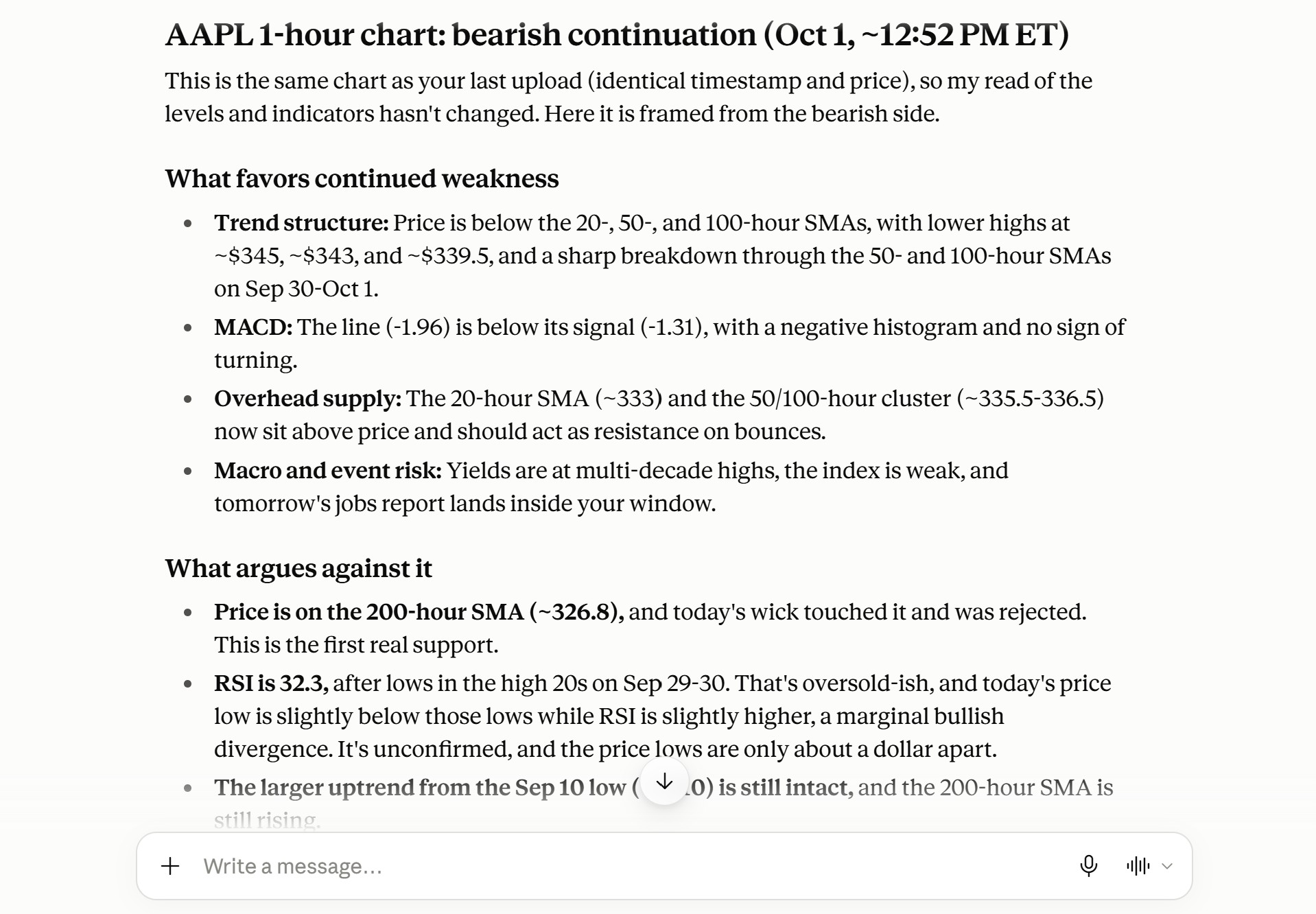
Claude can do a lot with chart screenshots, including identifying key support and resistance areas, highlighting convergence or divergence between momentum indicators and price (e.g. RSI divergences), and tracking volume changes around breakouts and breakdowns. It’s especially good at multi-timeframe analysis: give Claude charts showing the same ticker on 1-hour, 4-hour, and daily timeframes, for example, and it can tell you if a short-timeframe move is supported by higher-timeframe trends.
If you ask, Claude will even come up with ideas for trades based on the charts you give it, complete with entry and invalidation levels. But be very cautious asking for this. Claude only sees the charts you provide, not what’s happening in the rest of the market, and it has an incomplete understanding of your strategy and risk tolerance. While Claude’s trade ideas can be helpful for spotting setups, they can also cloud your judgment or waste time by encouraging you to investigate setups that aren’t a good fit.
Here is an example prompt to analyze charts with Claude:
Here is a 1-hour candlestick chart for Apple stock showing the 20, 50, and 200-hour moving averages, MACD, RSI, and volume. Analyze the chart to identify key support and resistance levels and any divergences between price and other indicators. Based on this chart, how likely is the current bullish trend to continue over the next 1-2 days? [Paste the chart into the chat window with this prompt.]
Strategy Development
You can also use Claude to help you build, optimize, and think through your trading strategy.
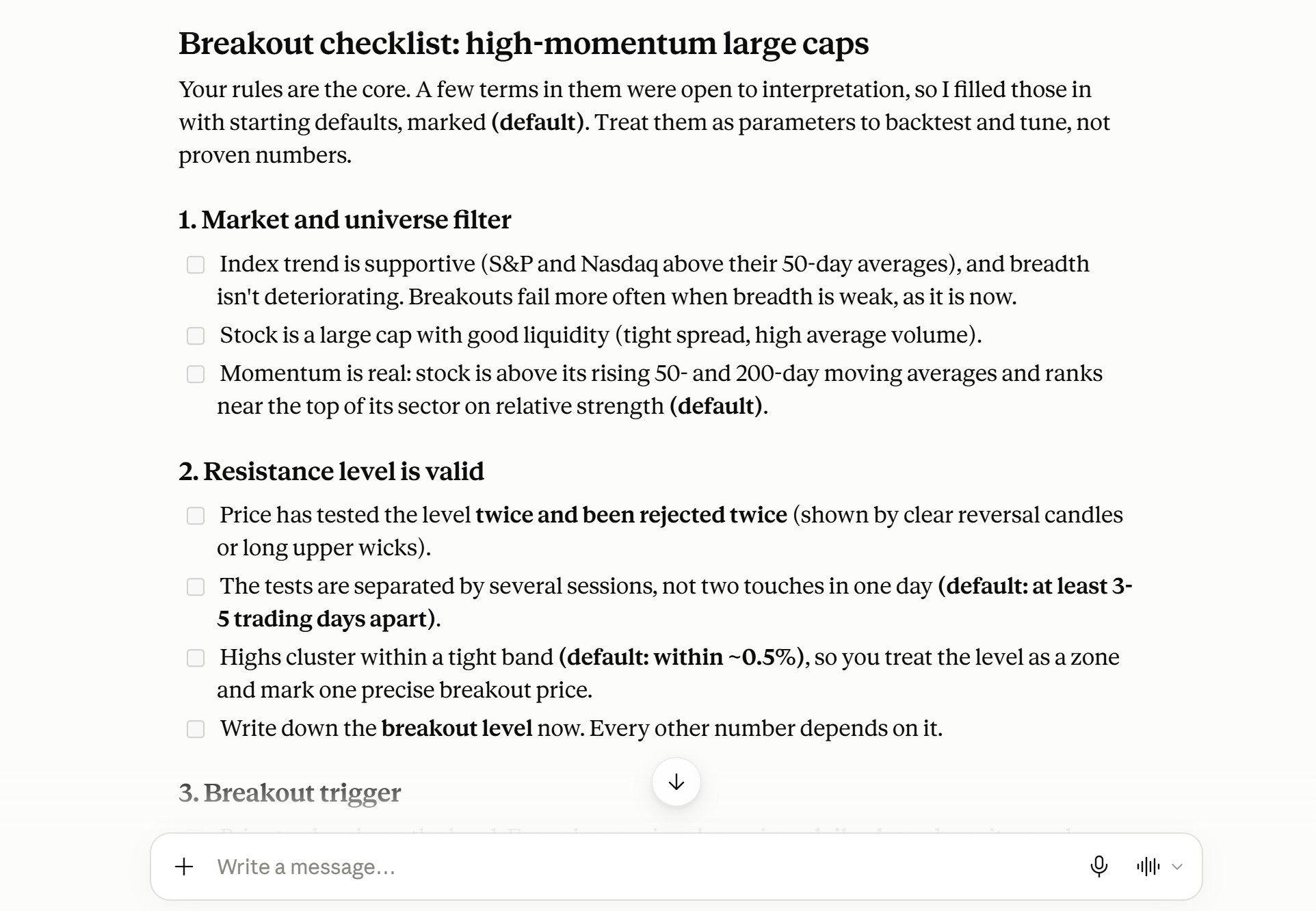
For example, it’s a good partner to bounce ideas off of as you develop trading rules. If you want to create a strategy around trading high-probability breakouts, Claude can help you clarify what triggers you’ll look for to enter a trade and what indicators or levels you’ll use to invalidate the continuation thesis. It can even turn those triggers into a personalized trading checklist, helping you avoid entering too early.
Taking that idea one step further, Claude can help you test your strategy with backtesting to see how it would have performed on past data. Backtests do not predict future results. Claude doesn’t actually have the historical data required to run a backtest itself, but it can write Python code you can run yourself. If your backtest shows that your strategy needs additional work, Claude can suggest parameters to test. Tuning to past data can overfit a strategy, so treat the results with caution.
If you have an idea for a custom indicator, Claude can assist with that, too. It’s capable of coding in Python, Pine Script, Thinkscript, and any other trading platform coding language. You can simply describe the indicator you want to make and Claude will do the programming for you.
Here’s an example of how to build trading strategies with Claude:
I want to create a trading strategy to find breakouts in high-momentum large-cap stocks. My strategy identifies a breakout when price crosses above a resistance level that’s been tested and rejected twice before, accompanied by a bullish MACD crossover and rising volume. The setup is invalidated if there’s a bearish MACD crossover or price drops below the breakout level by more than 1%. Can you build a trading checklist around this strategy that I can use to enter trades and set stop losses?
Performance Audits
Claude can also be a helpful partner for reviewing your trading performance.
To start, you need to give Claude a spreadsheet of your trades. Creating a column to categorize your trades by setup and additional columns for notes on your entries, exits, and thoughts on the trade can make the analysis much more powerful. If you use a trading journal, you may be able to download a spreadsheet with all this information directly from your journal.
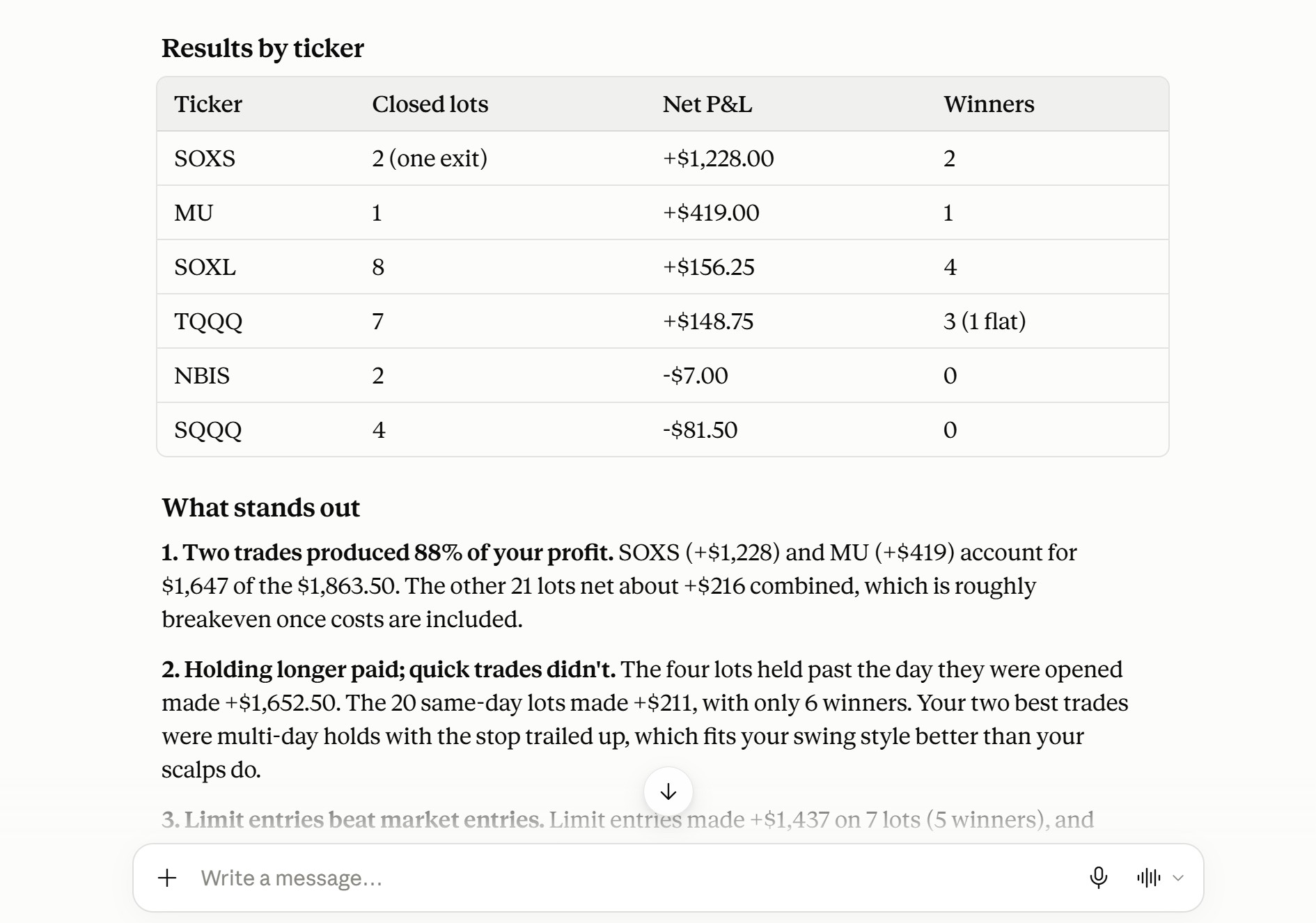
Once you have your trade data, you can ask Claude to inspect it for patterns. You can ask Claude to identify your most profitable setups, for example, or help you determine whether you’re holding positions too long or exiting too early. It can also point out instances where you broke your own trading rules.
To take your analysis one step further, you can also provide Claude with charts showing your trade setups, entries, and exits. Claude can use this additional information to analyze your drawdown during trades, help you grade setups based on your strategy parameters, and provide advice on where to place your stop losses.
Here’s an example prompt to review your trading performance with Claude:
I'm attaching a spreadsheet of my recent trades annotated by setup. Review my trades to identify patterns. Which setups are most profitable for me? Are there certain market conditions or tickers that are more profitable for me than others? Are there any mistakes I'm making repeatedly? [Attach a spreadsheet of your trades with this prompt.]
Claude’s Limitations for Trading
While Claude can be a genuinely useful research and strategy assistant, it’s not built for trading and it has significant downsides that you need to keep in mind.
No Access to Real-time Market Data
First, Claude lacks access to real-time market data. It’s easy to forget this since Claude is pretty good at sourcing recent price data from online databases. But recent price data isn’t particularly helpful for trading, especially if you’re researching volatile tickers that could see significant price swings throughout the day.
Worse, Claude doesn’t put a timestamp on the data it does offer. So some prices might be just a few minutes old, while others could be several days old. The only way for you to know is to check the data yourself, which wastes critical time in a fast-moving market.
Options data is especially unreliable since it can move so quickly. That makes it difficult to use Claude for assessing options strategies or institutional positioning around a stock, which is an important part of many trading strategies.
You can get real-time data by connecting Claude to a financial model context protocol (MCP) server, which we cover below. Some financial MCP servers require a paid subscription.
No Connection to Your Trading Account
Claude also lacks a connection to your trading account. While that may not seem like a big deal, it can matter a lot for intraday traders. Switching back and forth between your trading platform and Claude takes time, and there’s a non-zero chance of making a mistake when manually turning a trade you developed with Claude into an order on your platform.
Claude also doesn’t have any context about the current positions in your trading account unless you provide it. That can make risk management trickier since you’re responsible for identifying correlations between positions and managing your buying power.
Hallucination Risk
Claude and other AI chatbots like ChatGPT are also prone to “hallucinations,” or making things up. Claude can invent prices, market catalysts, earnings dates, and more while sounding completely confident in its bogus data. It’s especially prone to hallucinating when it can’t find a piece of data you ask for or if you ask it to perform basic calculations, like determining the position size needed to risk a certain amount on a trade.
Claude’s tendency to hallucinate creates significant risk that you make trading or strategy decisions based on incorrect information. But it also makes it difficult to trust Claude completely, slowing down the research and decision-making process since you need to verify the chatbot’s output.
Sycophantic Tendencies
Claude can also be sycophantic, meaning it tends to validate your ideas, even when they’re not great. For example, if you ask Claude about a specific trading setup, it might go into significant detail about entry points, supporting evidence for your thesis, and the potential return. But it won’t spend much time discussing evidence that contradicts your thesis or the potential risk if the trade goes against you.
The problem with this is that Claude can amplify your worst tendencies, like emotional trading, or encourage you to make the same mistakes you’re already prone to. At times, Claude can feel more like a cheerleader than a neutral assistant, which makes managing your trading psychology even more challenging than it already is.
Connecting Claude to a Trading MCP Server
If you plan to trade with Claude, you can make it more capable by connecting it to a trading-specific model context protocol (MCP) server. A trading MCP server acts as a gateway between Claude and a database of real-time price data, technical data, and other key trading information.
By connecting Claude to a trading MCP, you can give your chatbot access to real-time market data and, if you authorize it, the ability to create and send orders from your brokerage account. That addresses two common limits of general-purpose chatbots. It also adds risk: AI-generated orders can be wrong, and you are responsible for every order. When you compare trading MCP servers, look at the data they provide, their account functions, and their cost, and check any data before you act on it.
Clear Street’s MCP server provides real-time price quotes and options chains, analyst ratings, market news, and technical data like moving averages, momentum indicators, and volume. It also allows you to connect Claude to your Clear Street brokerage account so Claude can create order tickets. If you choose to authorize it, Claude can also send those orders for execution on your behalf.
Clear Street’s MCP server is free to use with a Clear Street account. Some other trading MCP servers charge a subscription fee.
Connecting Claude to Clear Street’s MCP server is simple. Start by signing up for a Clear Street account. Then in Claude:
- Go to Settings > Connectors > Add custom connector and enter the URL https://api.clearstreet.com/v1/mcp/trading.
- Under Advanced settings, enter the Client ID mOHlYq3NMBFqjDCo2NWkKQKSdzqIgE2O, then click Add.
- Click Connect and sign in with your Clear Street credentials to approve the connection.
Omni AI: Clear Street’s AI Assistant for Traders
While Claude paired with Clear Street’s MCP is a capable option for traders, it is still a general-purpose chatbot, not one built for trading. Another option is Clear Street’s Omni AI, an AI chatbot built for traders.
Omni AI pairs real-time market data and research with transparent risk analysis and context about your trading account. In addition to what you can do with Claude, you can use Omni AI to build watchlists, identify trade setups to research, plan entries and exits with risk in mind, stage orders for your review and confirmation, and analyze your portfolio performance. It’s an active trading copilot that assists with many parts of your workflow.
Omni AI is built directly into every Clear Street account. Open an account today to try Omni AI.
Disclosures
Securities offered through Clear Street LLC, member FINRA/SIPC.
All securities and investments are offered to self-directed customers by Clear Street LLC.
Not an offer or solicitation where Clear Street is not registered.
All investments involve risk; past performance does not guarantee future results.
Information is for informational purposes only, is not an offer, and may change without notice.
System response and execution times are affected by market and system factors.
Third-party AI tools are not provided or supervised by Clear Street. If you authorize one to send orders, you are responsible for every order it places, including errors.
Offer subject to terms and conditions. Other fees may apply. See full terms.
Omni AI (Clear Street Technologies LLC) is informational only, not advice; every order requires your confirmation.
Products and services offered by Clear Street LLC, member FINRA, SIPC, CFTC and NFA. Additional information about Clear Street is available on FINRA BrokerCheck, including its Customer Relationship Summary.
Clear Street does not provide investment, legal, regulatory, tax, or compliance advice. Consult professionals in these fields to address your specific circumstances. These materials are provided for informational purposes only and subject to change without notice or obligation to replace any information contained therein. This is not an offer, solicitation of an offer, or advice to buy or sell securities, or open a brokerage account in any jurisdiction where Clear Street is not registered. Securities trading, particularly trading on margin or using options, involves significant risk and is not suitable for all investors.
Related blogs
.avif)
.avif)

.svg)