Trading
Oct 30, 2026
Clear Street
How to Connect Claude or ChatGPT to Your Brokerage Account: Step-by-step Guide

Learn how to connect Claude or ChatGPT to your brokerage account in our step-by-step guide and start trading with conversational AI.
AI chatbots like Claude and ChatGPT are increasingly powerful for trading. Many brokers now allow you to connect your chatbot directly to your account so you can analyze setups, enter orders, and manage your positions with conversational prompts.
We’ll walk through how to connect Claude or ChatGPT to your brokerage account and turn your chatbot into a capable trading copilot.
Step 1: Choose a Broker That Supports AI Connections
To get started, you need a broker that offers a trading model context protocol (MCP) server for your preferred LLM.
An MCP server for trading acts as a gateway between an LLM and your broker’s computer systems. When you give your chatbot a command like “List my open positions,” the MCP server translates that text-based prompt into a database request, collects the required information about your positions, and passes the data to your LLM in a structured format the chatbot can understand.
A growing number of brokerage firms now offer trading MCP servers, but not all do—and some MCP servers require a costly monthly subscription. Clear Street’s MCP server is included with every account and supports Claude, Claude Code, and ChatGPT.
Step 2: Connect Your AI Chatbot
Once you have an AI-compatible brokerage account, the next step is to connect your chatbot to the MCP server. We’ll explain how to do this for Claude and ChatGPT using Clear Street’s MCP server.
How To Connect Claude
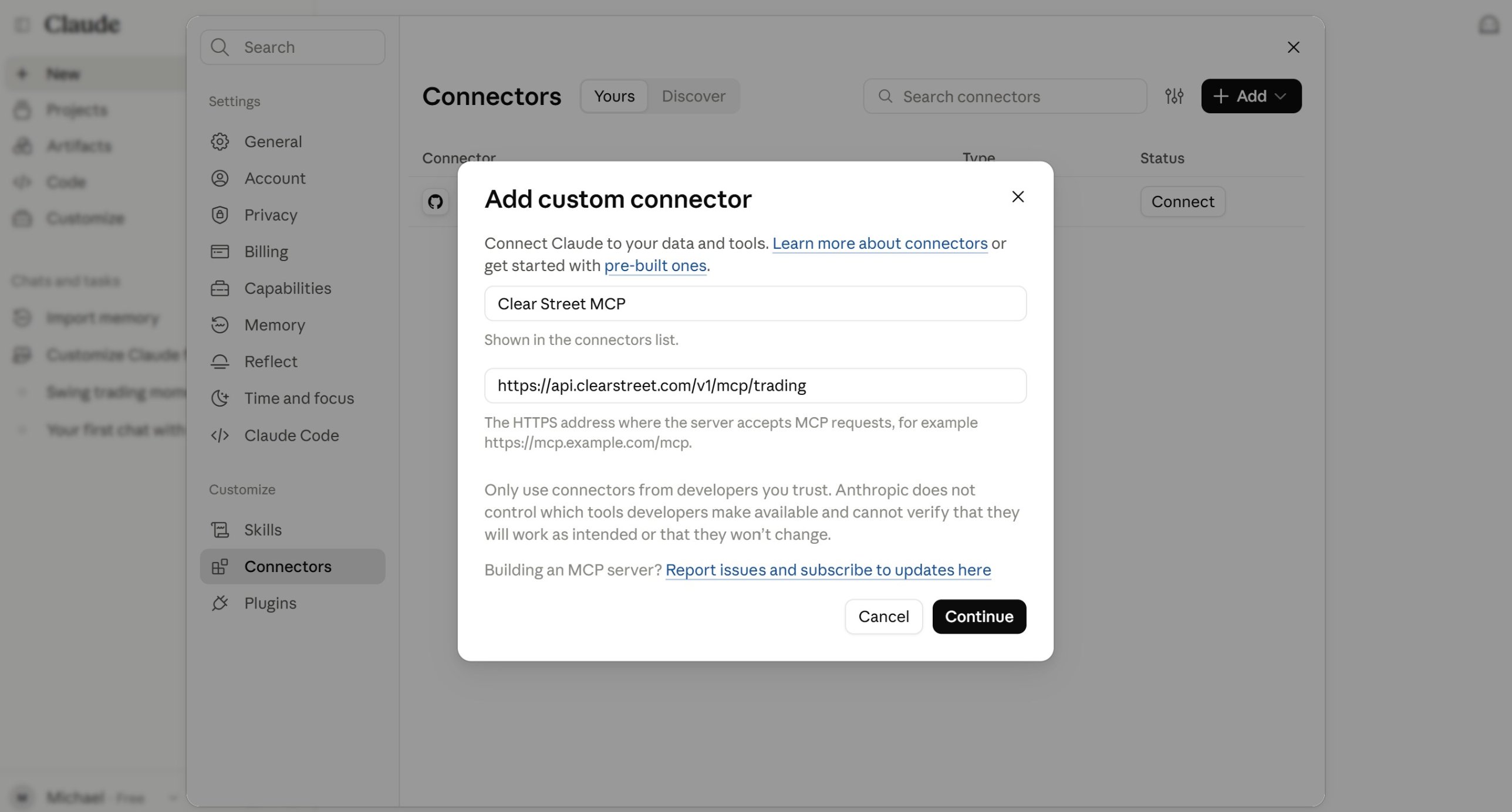
- Navigate to Settings, then Connectors and click Add custom connector.
- Give your connector a name (like “Clear Street MCP”). Then enter the MCP server’s URL. Use https://api.clearstreet.com/v1/mcp for read-only (no trade execution) or https://api.clearstreet.com/v1/mcp/trading to give Claude execution capability. Click Continue.
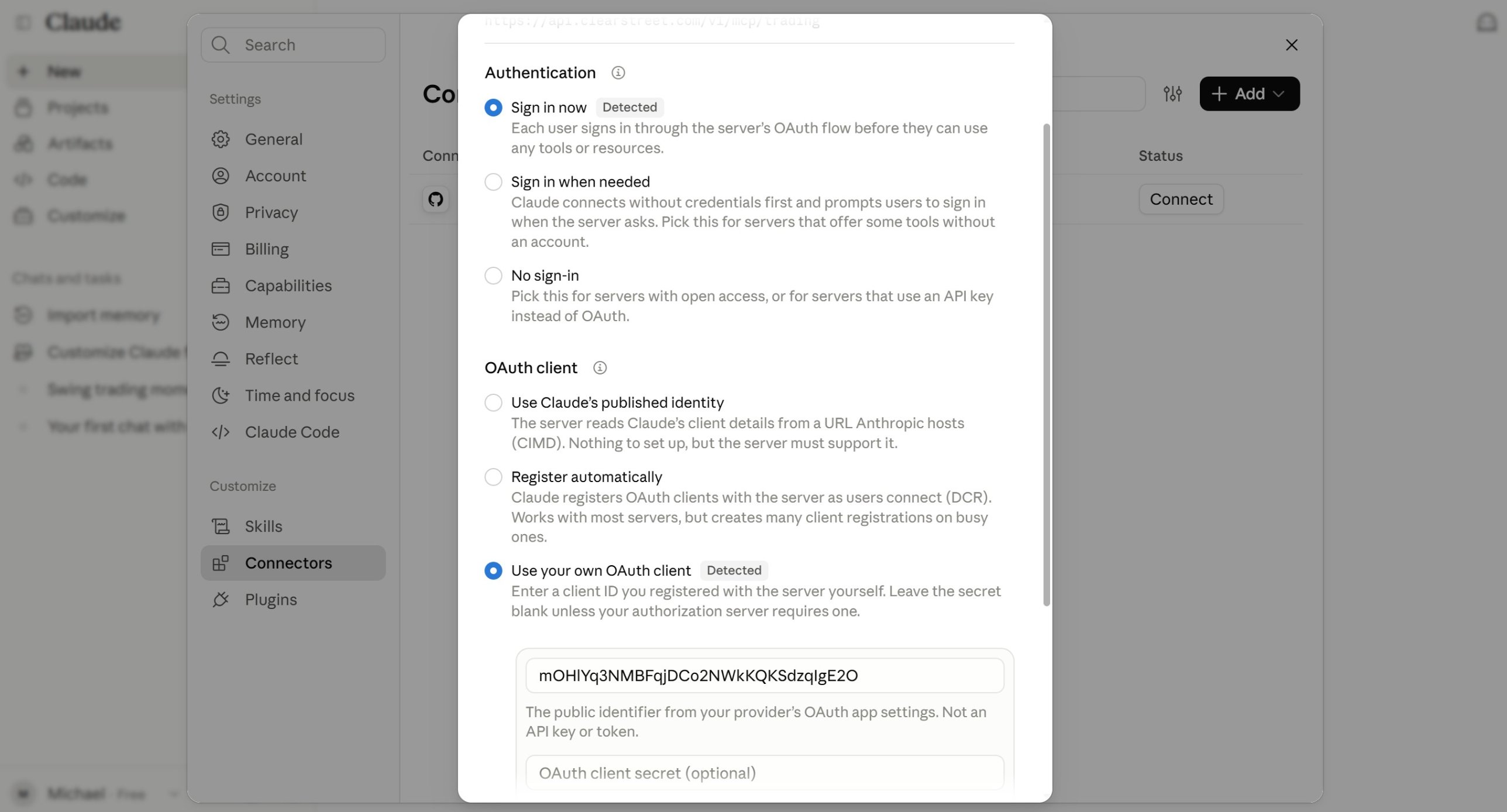
- In the next settings window, select Sign in now as the Authentication option.
- Under OAuth client, select Use your own OAuth client. Enter the OAuth client ID mOHlYq3NMBFqjDCo2NWkKQKSdzqIgE2O and leave the OAuth client secret blank. Click Add.
How To Connect ChatGPT
- Navigate to Plugins and click Add, then select Create custom MCP server.
- In the settings box that appears, give your connection a name (like “Clear Street MCP”). Then enter the MCP server’s URL. Use https://api.clearstreet.com/v1/mcp for read-only (no trade execution) or https://api.clearstreet.com/v1/mcp/trading to give ChatGPT execution capability.
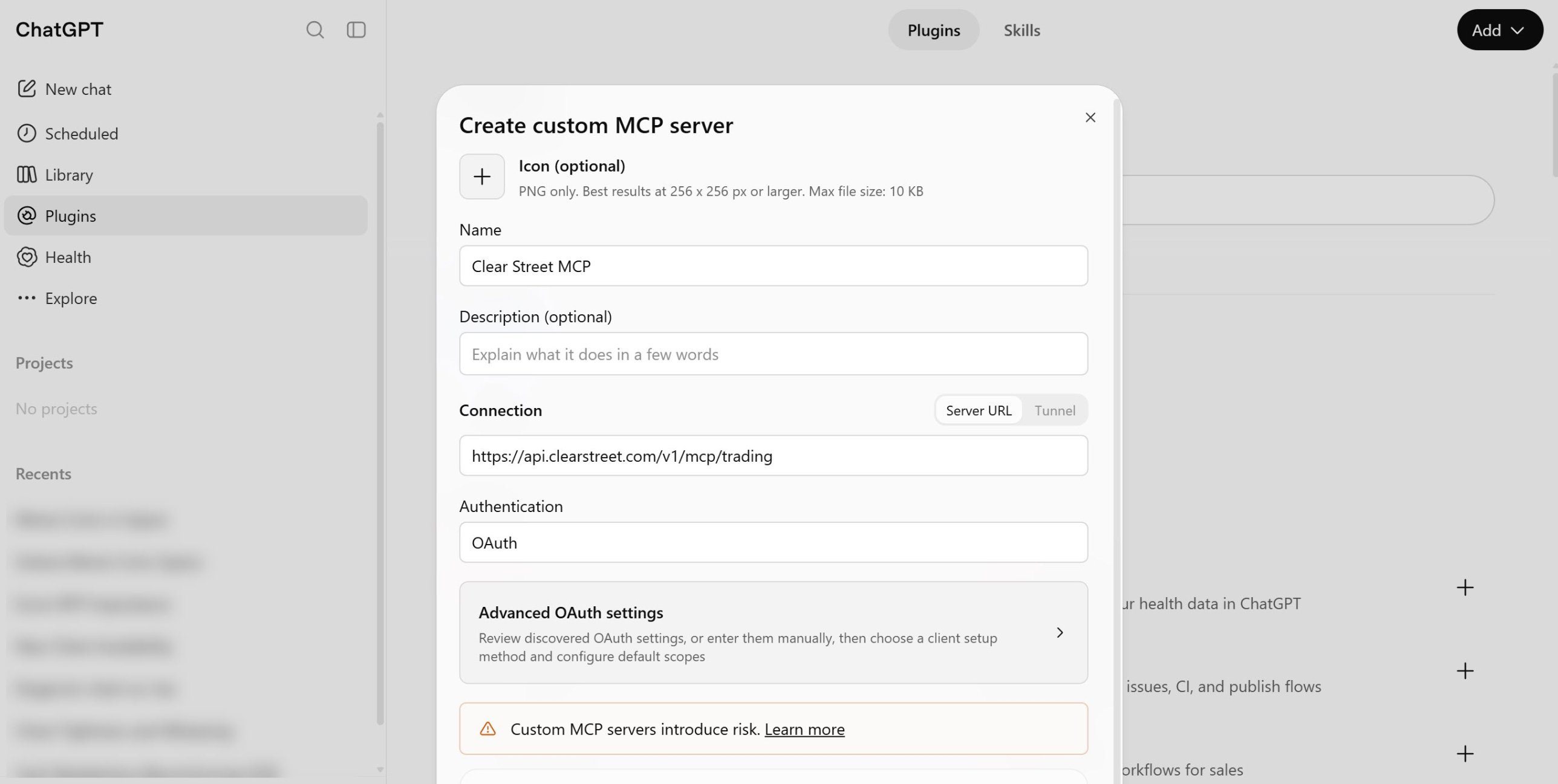
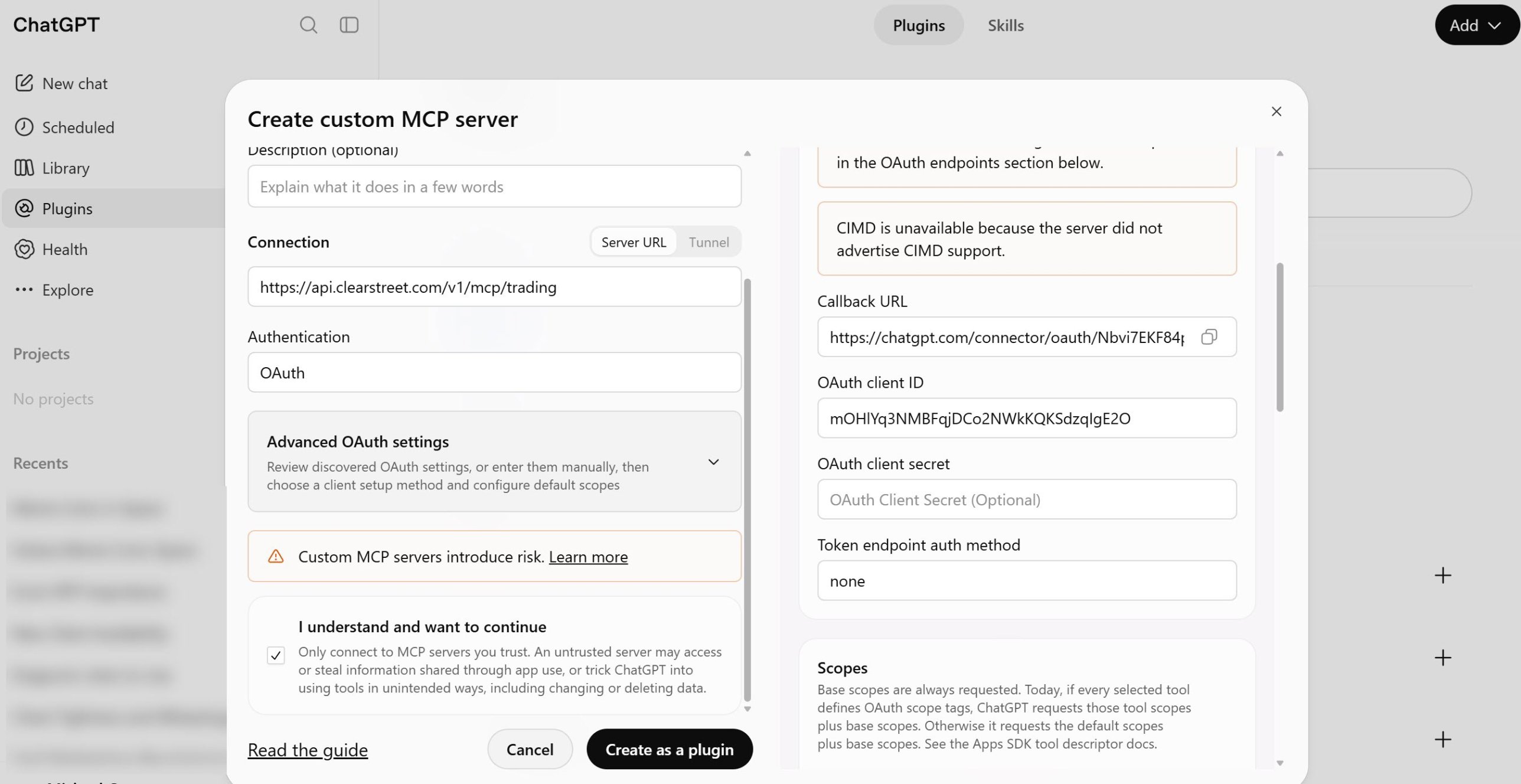
- Select OAuth as the Authentication method and click Advanced OAuth settings. Scroll down to the OAuth client ID box and enter mOHlYq3NMBFqjDCo2NWkKQKSdzqIgE2O.
- Check the “I understand and want to continue” box. Then click Create as a plugin.
Step 3: Sign in to Your Brokerage Account
Next, you need to sign in to your brokerage account to authenticate the MCP connection and allow your LLM access to your account.
In either Claude or ChatGPT, select the connector or plugin you just created and click Connect. Then sign in to your brokerage account using your username and password.
Step 4: Verify the Connection
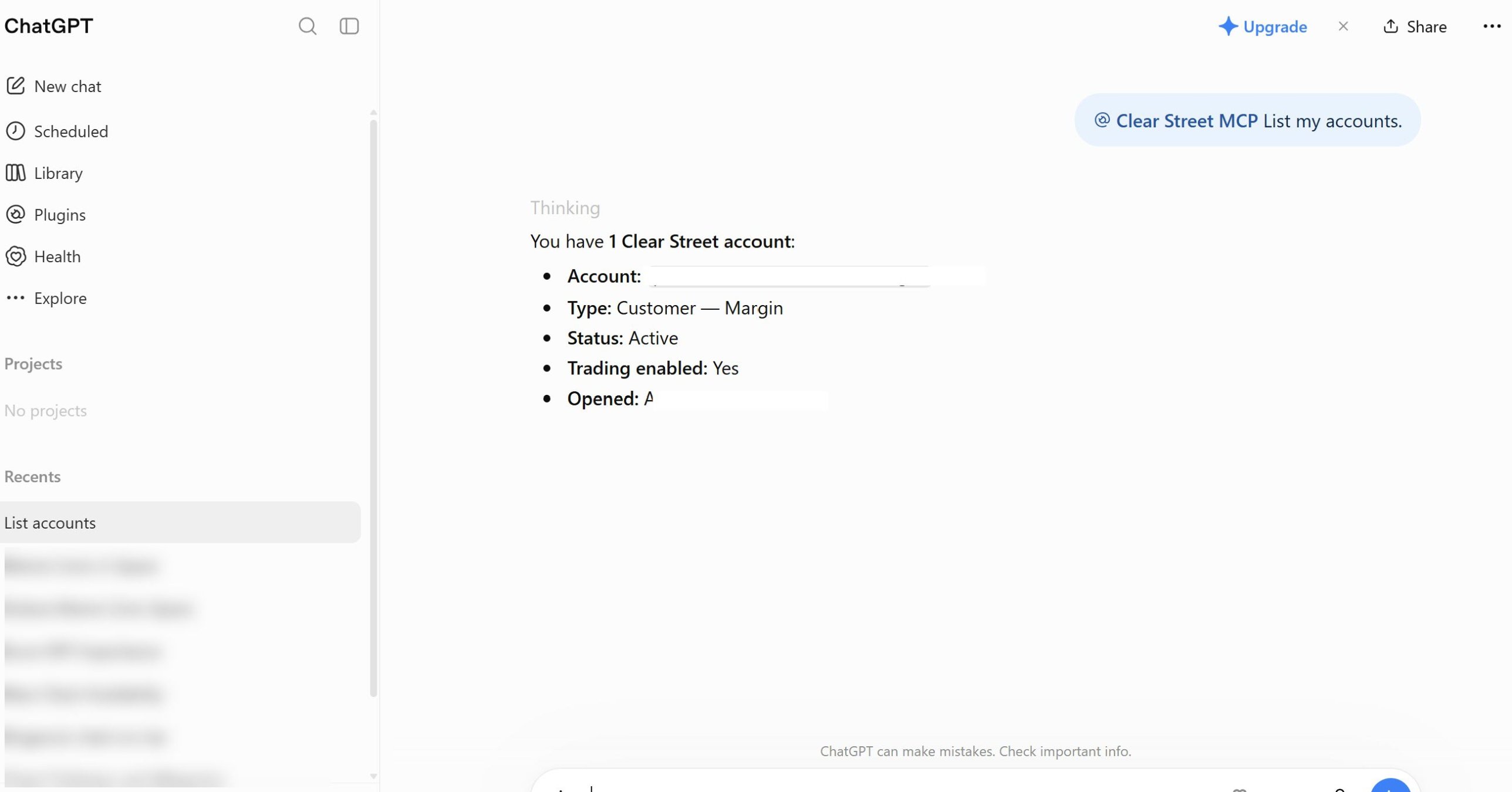
Your LLM should now be connected to your brokerage account, but it’s a good idea to test the connection before you start trading.
Ask your LLM to list your accounts and current positions. If it displays the data correctly, you’re ready to start using AI to trade with your broker. If it returns an error, double-check your connection settings and try opening a new conversation with your chatbot. If the issue persists, contact your broker’s support team for assistance.
What Can AI Do in Your Brokerage Account?
Connecting Claude or ChatGPT to your broker’s MCP server gives your chatbot a wide range of new capabilities. Here are a few of the things Claude and ChatGPT can do when connected to Clear Street’s MCP server:
- Manage your watchlists, including adding tickers and building a daily focus list
- Analyze market trends and news to help you find trade ideas
- Build intraday screens using price, volume, and technical data
- Analyze trade opportunities based on technicals, catalysts, and historical data
- Place trades and manage your open orders
- Review your trading performance and identify opportunities for improvement
Keep in mind that your AI’s trading capabilities will vary depending on the exact functionality and data your broker’s MCP server offers. For example, if a broker’s MCP server doesn’t give your chatbot access to technical data, its ability to analyze setups may be much more limited.
Important Considerations
Account Security
When you link your AI chatbot to your broker’s MCP server using OAuth, your LLM never sees your account credentials. This is important because chatbots can be tricked into revealing private information like passwords. Never share your brokerage account credentials in your AI conversation.
Trading Permissions
Some brokers, including Clear Street, offer both read-only and trading-capable MCP servers. On the read-only server, your LLM will be able to view your positions, access live data, and even help you craft orders—but it won’t be able to submit those orders, even if you ask it to. On the trading-capable server, your LLM will have the ability to submit, cancel, and modify orders.
It’s a good idea to start out using the read-only server until you’re comfortable using AI to explore trade ideas and know how your LLM responds to different trading-related prompts. If you switch to the trading-capable server, make sure you carefully review staged orders for errors before asking your AI to submit them.
Hallucination Risk
Even if your broker’s MCP server provides your LLM with market information, AI hallucination remains a risk. Your chatbot is less likely to make up prices or options chains if these are sourced directly from your broker. However, if a data point is missing—for example, if you ask for a technical metric that isn’t calculated in your broker’s database—your AI could invent a data point rather than telling you that information isn’t available.
As a precaution, instruct your LLM to tell you if information isn’t available or if it’s sourcing information from the web rather than from your broker’s MCP server. This won’t eliminate hallucination entirely, so always double-check key information before trading.
Connect Your AI Chatbot to Clear Street Today
Connecting Claude or ChatGPT to your brokerage account marks a fundamental shift in how you interact with the markets. With Clear Street’s trading MCP server, your AI becomes a real-time trading copilot capable of accessing real-time quotes, conducting in-depth analysis, and executing orders in your account.
Ready to transform your trading workflow with AI? Open a Clear Street account today to get started.
Products and services offered by Clear Street LLC, member FINRA, SIPC, CFTC and NFA. Additional information about Clear Street is available on FINRA BrokerCheck, including its Customer Relationship Summary.
Clear Street does not provide investment, legal, regulatory, tax, or compliance advice. Consult professionals in these fields to address your specific circumstances. These materials are provided for informational purposes only and subject to change without notice or obligation to replace any information contained therein. This is not an offer, solicitation of an offer, or advice to buy or sell securities, or open a brokerage account in any jurisdiction where Clear Street is not registered. Securities trading, particularly trading on margin or using options, involves significant risk and is not suitable for all investors.
Related blogs